Phishing Attacks and Employee Exposure: How to Find Who Is Most at Risk in Your Organization
An employee receives an email from IT support asking them to verify their credentials after a “security incident.” The email references their actual job title, mentions a real project they work on, addresses them by name, and links to a login page that looks identical to the company’s SSO portal. They enter their password. Twenty minutes later, an attacker is inside your network.
This is not a hypothetical scenario. It is what modern phishing looks like — and it is working at an alarming rate.
What makes this attack effective is not the fake login page. It is the research. The attacker knew the employee’s name, role, current projects, and which platforms the company uses. They knew this because all of it was publicly available — on LinkedIn, in breach databases, in document metadata, on GitHub, and across dozens of other sources the employee never thought about.
Phishing attacks do not succeed because employees are careless. They succeed because some employees are more exposed than others — and organizations rarely know which ones. The CFO whose email appears in six data breaches. The developer whose GitHub commits reveal internal project names. The HR manager whose LinkedIn profile lists every tool the company uses.
This guide covers how AI-driven phishing attacks are exploiting publicly available employee data, why traditional anti-phishing training is not enough, how to identify the people in your organization who are most at risk, and what you can do to reduce their exposure before an attacker uses it against them.
The Evolution of Phishing: From Spray-and-Pray to AI-Driven Precision
Phishing has evolved more in the last two years than in the previous decade. The shift from mass, generic phishing campaigns to highly targeted, AI-driven attacks is fundamentally changing the threat landscape.
The Old Model: Volume Over Quality
Traditional phishing relied on volume. Send millions of emails with a generic “Your account has been compromised” message, a suspicious link, and hope that a small percentage of recipients click. These campaigns were effective at scale but easy to spot — poor grammar, generic greetings, obvious domain spoofing.
Organizations responded with email filters, URL scanning, and security awareness training. Employees learned to look for misspellings, hover over links before clicking, and report suspicious messages. For years, this was largely enough.
The New Reality: AI-Driven Phishing Attacks
The FBI has warned about a new generation of AI-driven phishing attacks that are fundamentally different from what came before. These attacks use artificial intelligence to:
- Generate grammatically perfect, contextually relevant emails that pass every “does this look suspicious?” check employees have been trained to apply
- Scrape and synthesize publicly available information about targets — combining LinkedIn profiles, social media activity, breach data, and corporate website content into detailed target profiles
- Clone writing styles from legitimate senders by analyzing their public communications, making spoofed emails indistinguishable from genuine ones
- Create convincing voice and video deepfakes for vishing (voice phishing) and video call impersonation attacks
- Adapt in real time based on the target’s responses, pivoting strategies mid-conversation
The scale is staggering. AI tools can generate thousands of uniquely personalized phishing emails per hour — each one tailored to a specific individual based on their public data footprint. What once required days of manual reconnaissance by a skilled social engineer now takes minutes.
Why This Changes Everything
The critical shift is that AI-driven phishing attacks eliminate the signals employees were trained to detect. There are no misspellings. There are no generic greetings. The sender address looks legitimate. The content is relevant and timely. The link goes to a domain that looks almost identical to the real one.
When the phishing email references a real project, uses the correct internal terminology, and appears to come from a colleague the employee works with daily — the traditional “think before you click” defense collapses. The email does not look suspicious because it was engineered not to.
This means the defense has to shift upstream. Instead of relying on employees to detect phishing, organizations need to reduce the raw material that makes these attacks possible — the publicly available employee data that attackers use to craft them.
Why Some Employees Are More Exposed Than Others
Not everyone in your organization carries the same phishing risk. Exposure is not about technical literacy or security training completion rates. It is about how much information about a person is publicly accessible and how valuable that information is to an attacker.
The Exposure Gradient
Think of employee exposure as existing on a gradient:
Low exposure — An employee whose work email does not appear in any breach databases, who uses minimal social media, whose name does not appear in public documents, and who has no publicly discoverable accounts beyond basic professional profiles.
Moderate exposure — An employee whose email appears in one or two old breaches (likely with outdated passwords), who has standard LinkedIn and social media presence, and whose name appears in some public company materials.
High exposure — An employee whose email appears in multiple recent breaches, who is active on numerous social platforms with detailed personal information, whose username is consistent across services (making account enumeration trivial), who has published code, documents, or presentations containing organizational details, and who occupies a role that makes them a high-value phishing target.
The problem is that most organizations have no idea where their employees fall on this gradient. They invest in phishing simulations that test all employees equally, when the actual risk is concentrated in the employees with the most exposure.
Roles That Attract Targeted Phishing
Certain roles are disproportionately targeted because of their access, influence, or visibility:
- C-suite executives — Highest access, highest authority for financial transactions, most public profiles. CEO fraud and business email compromise (BEC) specifically exploit executive authority
- Finance and accounting — Direct access to payment systems and wire transfers. Attackers impersonate executives or vendors to initiate fraudulent payments
- IT and system administrators — Access to critical infrastructure, credentials, and security tools. Compromising IT staff often leads to complete network compromise
- HR and recruiting — Handle sensitive employee data, receive many external emails (resumes, inquiries), and are accustomed to opening attachments from unknown senders
- Developers and engineers — Active on public platforms (GitHub, Stack Overflow), often have deployment access, and may use the same credentials across personal and professional accounts
- Sales and customer-facing roles — Regularly communicate with external contacts, making it harder to identify illegitimate external messages
- Executive assistants — Often have delegated access to executive calendars, email, and financial approval systems
Each of these roles has a distinct exposure profile. A developer’s risk comes from their code contributions and technical community presence. A CFO’s risk comes from their public profile and financial authority. Understanding these differences is the foundation of effective phishing defense.
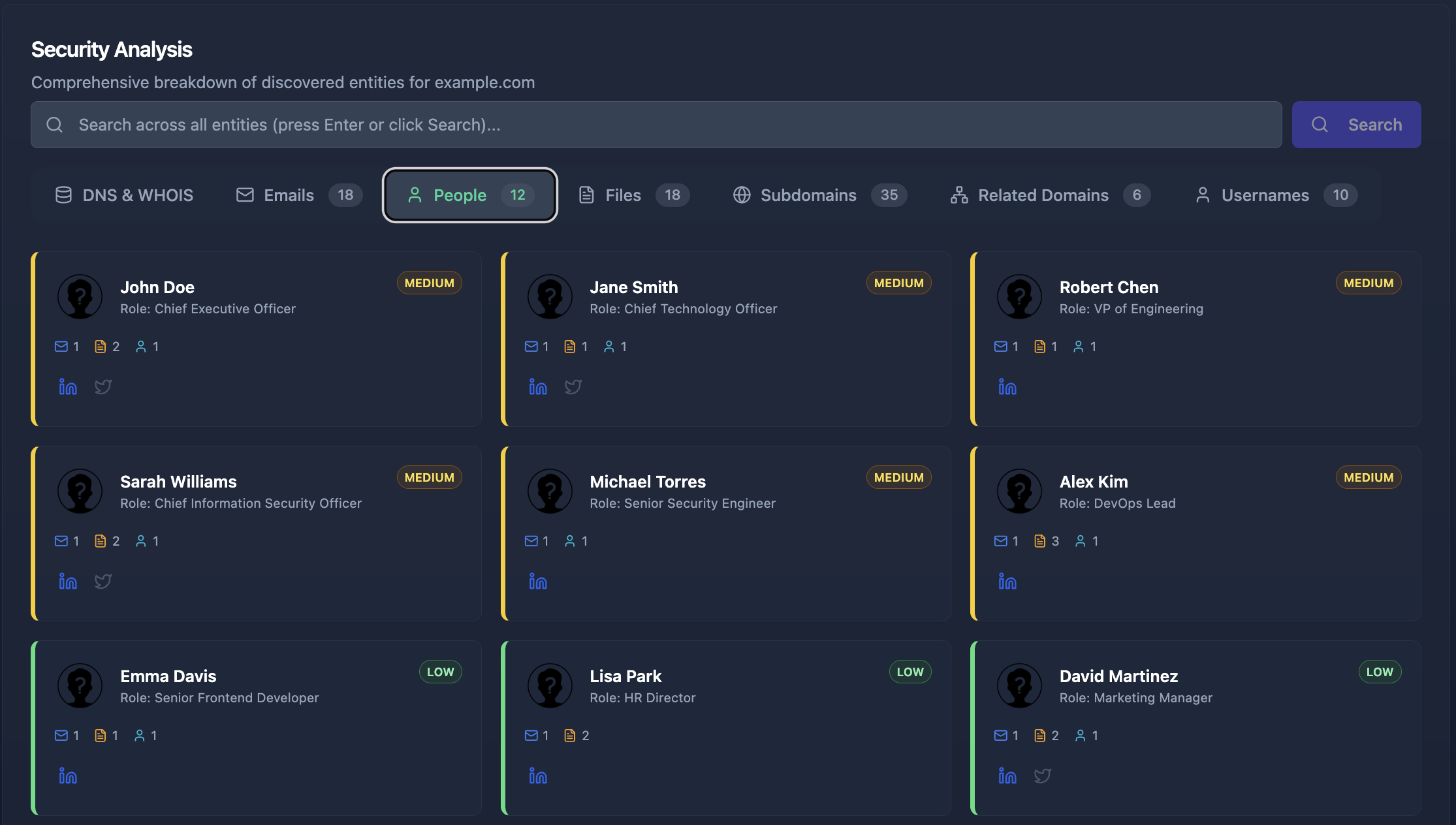
How Attackers Build Their Target List
Before an attacker sends a single phishing email, they spend time building a detailed profile of potential targets. This reconnaissance phase uses the same OSINT techniques that security professionals use for defensive purposes — except the attacker is using them to find the path of least resistance into your organization.
Step 1: Harvest Email Addresses
The first thing an attacker does is collect employee email addresses. These come from:
- Company websites — team pages, press releases, contact forms, and PDF documents containing author metadata
- LinkedIn — employee profiles that list or make inferable their work email pattern (if one employee is
firstname.lastname@company.com, the pattern applies to everyone) - GitHub and code repositories — developer emails in commit histories
- Google dorking — queries like
site:company.com "@company.com"surface indexed email addresses - Data breaches — leaked databases contain millions of corporate email addresses
- Conference presentations and whitepapers — author contact information
Cyborux performs this entire email discovery process automatically — enter your domain and it collects employee emails from all of these sources in minutes, without manual queries or tool configuration.
Step 2: Check Breach Databases
With a list of employee emails, the attacker checks each one against breach databases to see whether an email has appeared in known breaches — and which credentials were exposed.
An employee whose email appears in multiple breaches — especially recent ones with plaintext or weakly hashed passwords — is an immediate high-priority target. If the employee reuses passwords (and studies consistently show that the majority of people do), the attacker may already have valid credentials for corporate systems.
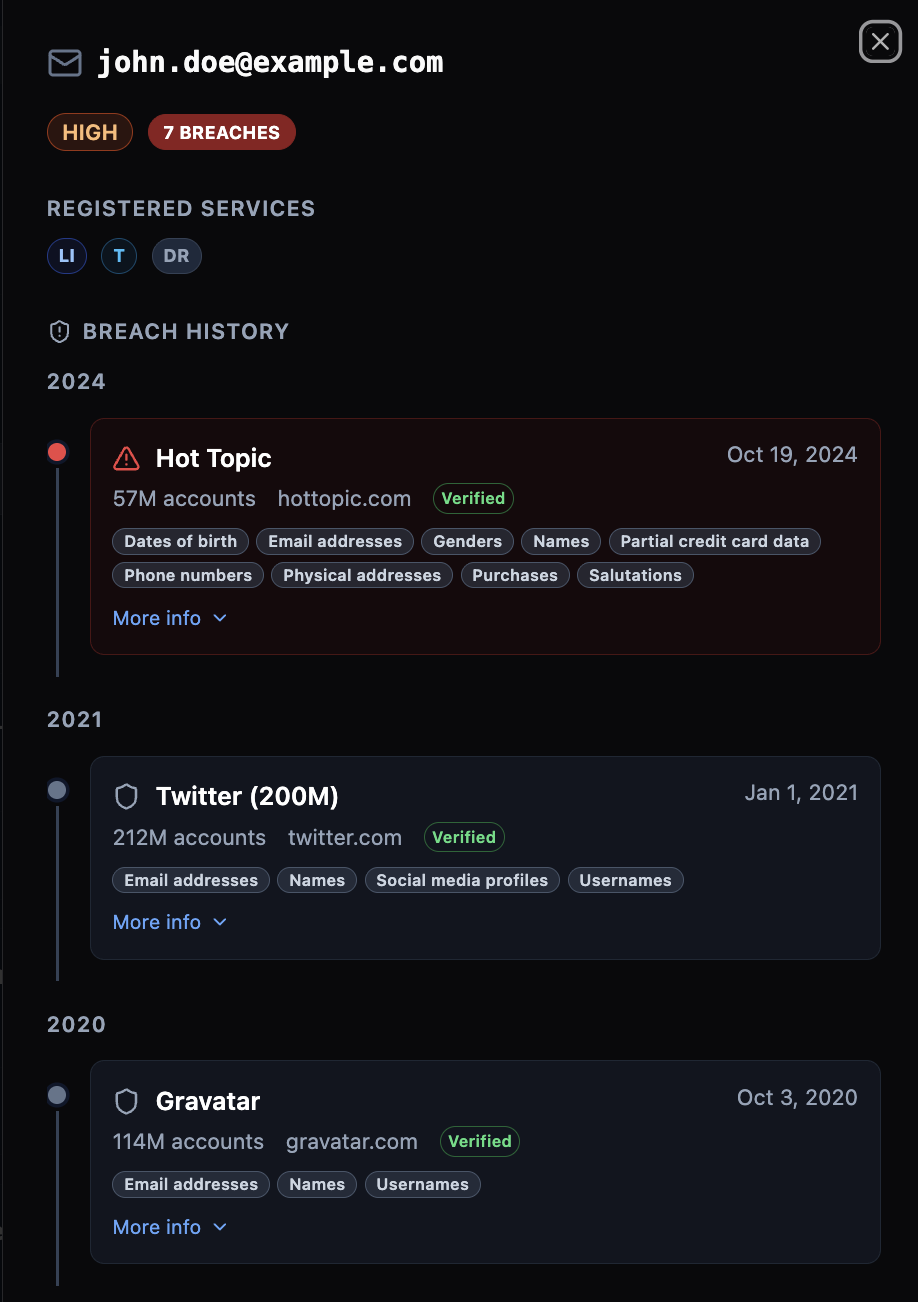
Step 3: Map the Digital Footprint
This is where the reconnaissance becomes dangerous. Using tools that enumerate which platforms an email is registered on, the attacker maps out each employee’s digital life. Which social networks are they on? Do they use Slack, Discord, Dropbox, or other collaboration tools? Are they registered on forums, gaming platforms, or dating sites?
Each registered account is another data point. Each platform is another potential source of personal information and another surface for credential stuffing attacks.
Step 4: Correlate and Profile
The attacker combines everything into a target profile:
- Name, role, and reporting structure from LinkedIn
- Technical interests and projects from GitHub and Stack Overflow
- Personal interests and social connections from social media
- Breach history and potential credentials from breach databases
- Platform registrations from account enumeration
- Published documents and metadata from Google dorking
With this profile, the attacker crafts a phishing email that feels personal, relevant, and trustworthy — because it is built entirely from real information about the target.
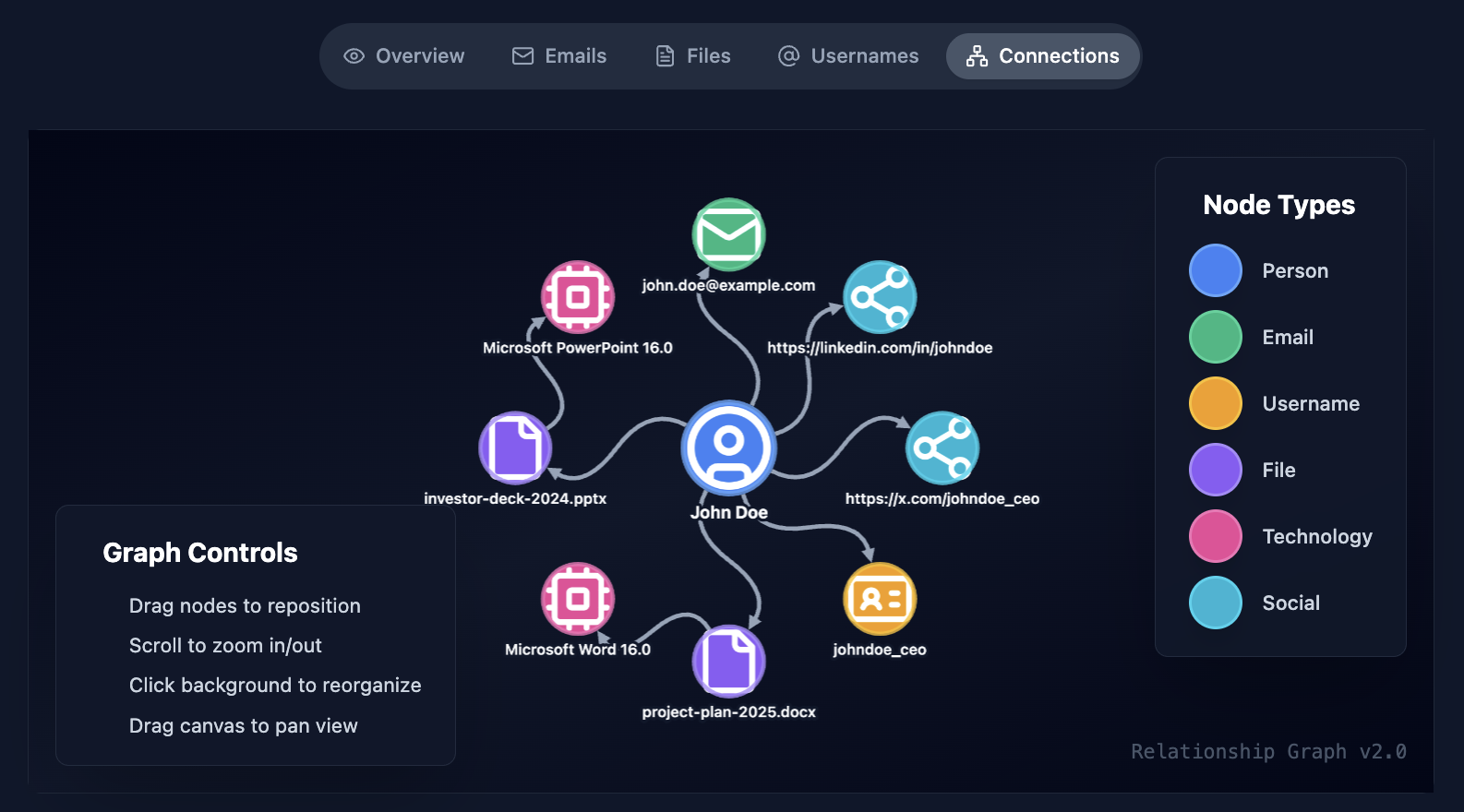
The Automation Factor
This entire process used to take hours per target. With AI tools and automated OSINT frameworks, an attacker can profile hundreds of employees in minutes. The bottleneck is no longer the attacker’s time or skill — it is the amount of publicly available data about your employees. And that is something you can control.
Identifying Your Most Exposed Employees
If attackers are building profiles of your employees using public data, the most effective defense is to see what they see — and fix it before they exploit it. Here is how to systematically identify which employees are most exposed to phishing attacks.
Email Exposure Assessment
Start with the most direct indicator: how many of your employees’ work emails appear in known data breaches?
This is not a theoretical risk. When an employee’s work email appears in a breach database, it means:
- The email address is confirmed as valid and active (attackers know a real person reads it)
- There may be associated passwords that the employee has reused elsewhere
- The breach record may include additional personal data (phone numbers, physical addresses, security question answers)
- The employee is now in attacker databases and targeting lists permanently
Run every employee email in your organization against breach notification services. Prioritize employees who appear in:
- Multiple breaches — indicates widespread account exposure
- Recent breaches — credentials are more likely to still be valid
- Breaches with password data — direct credential compromise risk
- Breaches from platforms related to your business — higher chance of credential reuse
Platform and Account Enumeration
Beyond breach databases, determine which online platforms each employee is registered on using their work email. An employee registered on 30 platforms has a larger attack surface than one registered on 5 — more accounts to compromise, more personal data scattered across services, more potential phishing vectors.
Pay particular attention to:
- Platforms with known past breaches — registered accounts on previously breached services
- Password managers — registration indicates the employee stores credentials online (itself not a risk, but the password manager becomes a high-value target)
- Developer and code platforms — GitHub, GitLab, and Stack Overflow profiles often contain organizational information in public repositories
- Social media platforms — detailed personal information that feeds social engineering
Username Consistency Analysis
When an employee uses the same username across multiple platforms — which most people do — compromising one account provides the key to finding all others. Assess username consistency by checking whether the email username (the part before @) matches usernames on discovered platforms.
Employees who use their real name or a consistent handle across services are significantly easier to profile than those who use unique identifiers per platform.
Social Media and Public Information Audit
Evaluate the depth of personal and professional information each employee makes publicly available:
- LinkedIn — Does their profile reveal internal project names, technology stacks, or organizational structure details that an attacker could reference in a phishing email?
- Twitter/X — Do they discuss work-related topics that reveal internal processes or frustrations an attacker could exploit?
- GitHub — Do their public repositories or commit messages reference internal systems, staging URLs, or API endpoints?
- Conference talks and publications — Have they presented on internal tooling or processes in ways that reveal operational details?
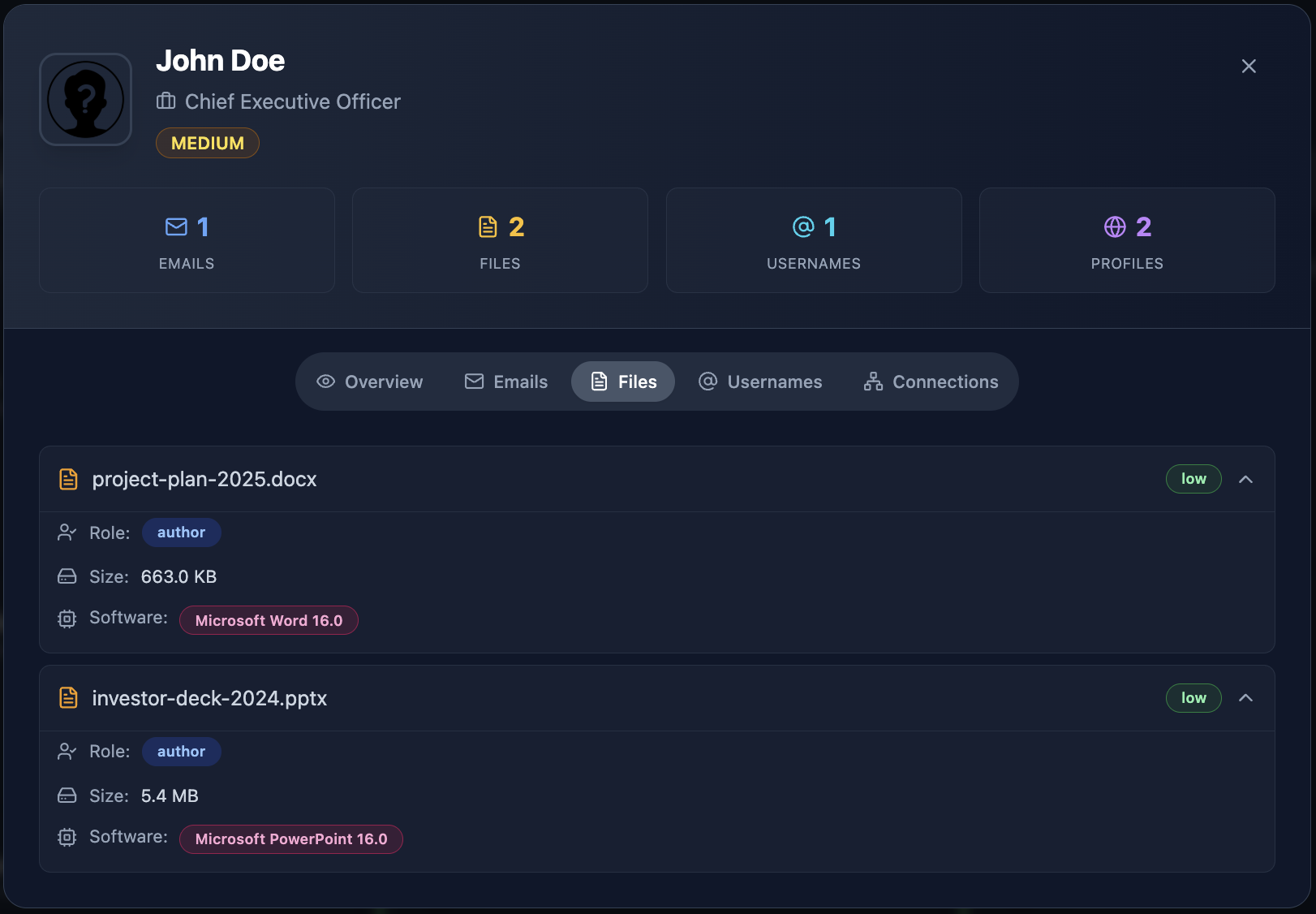
Document Metadata Exposure
Documents published on your domains often contain employee metadata. PDFs, Word documents, and spreadsheets routinely embed author names, email addresses, internal file paths, and software version information — invisible to the reader but trivially extractable by an attacker.
This metadata often reveals information about internal systems and processes that was never intended to be public. Cyborux automatically discovers documents hosted on your domain and extracts their metadata, surfacing files that expose employee data without requiring manual Google dork queries.
Building an Exposure Score
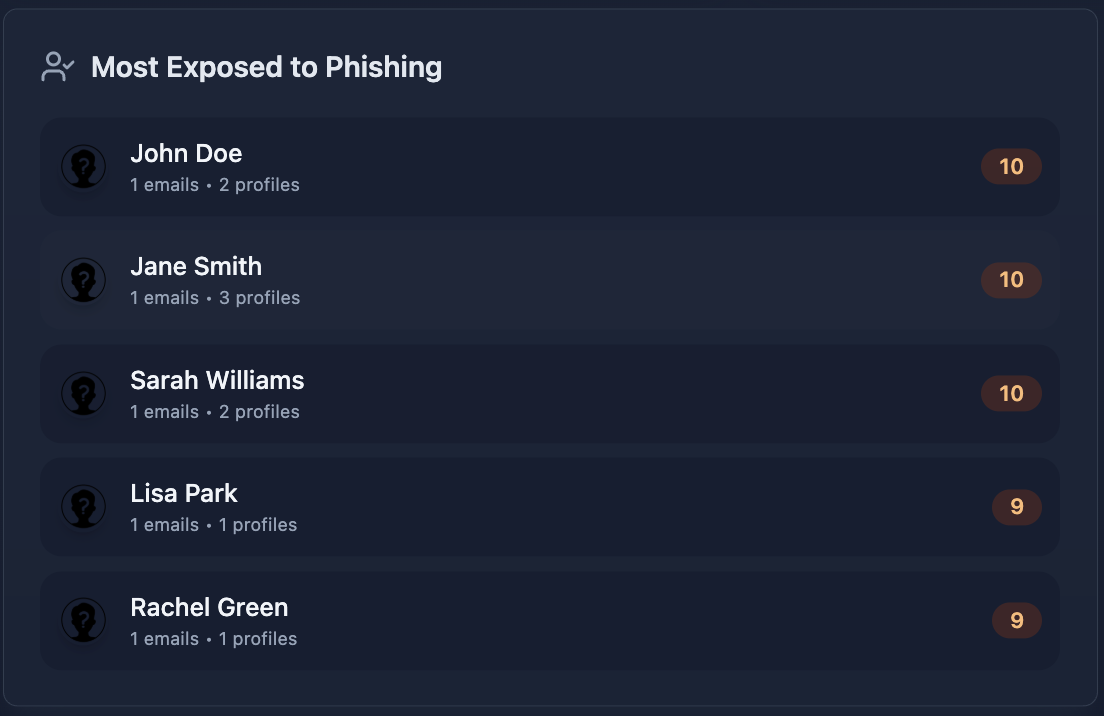
Combine these assessments into a composite exposure score for each employee:
Employees who score “High” across multiple categories are your highest-priority targets for exposure reduction. These are the people an attacker would profile first — because the most data is available about them and their access makes them the most valuable entry point.
What Anti-Phishing Training Gets Wrong
Let’s be clear: security awareness training is not useless. It is necessary. But it is insufficient — and the way most organizations implement it creates a dangerous false confidence.
The Simulation Trap
Most organizations measure phishing resilience through simulated phishing campaigns. They send fake phishing emails, track who clicks, and report a “click rate” as a metric of organizational risk. Click rates go down over time, and everyone feels better.
But simulated phishing campaigns typically test employees against generic, moderately convincing emails — the kind that traditional filters catch anyway. They do not test against AI-driven phishing attacks that reference real projects, use correct internal terminology, and appear to come from a known colleague. When the phishing email is indistinguishable from a legitimate one, click rate metrics become meaningless.
Training Cannot Fix Exposure
Training teaches employees to be suspicious. But suspicion has limits. An employee who receives a perfect phishing email — one that references their actual project, uses the name of their actual manager, and links to a domain that is one character different from the real one — will click. Not because they were not trained, but because the email passed every test they were taught to apply.
The variable that determines whether this attack succeeds is not the employee’s training. It is how much information the attacker had to work with when crafting the email. An attacker who knows the employee’s role, projects, colleagues, breach history, and platform registrations will produce a phishing email that no amount of training can reliably detect.
This is why reducing employee exposure is more effective than increasing employee training. Training addresses the last line of defense. Exposure reduction addresses the first step in the attack chain.
A Better Approach: Layered Defense
Effective phishing defense is not training OR exposure reduction — it is both, plus technical controls:
- Reduce exposure — Shrink the public data that attackers use to craft targeted phishing
- Technical controls — Email authentication (SPF, DKIM, DMARC), AI-powered email filtering, URL sandboxing, attachment scanning
- Awareness training — Teach employees to report suspicious emails (not just to avoid clicking)
- Process controls — Out-of-band verification for financial transactions, MFA on all accounts, separation of duties for high-risk actions
- Continuous monitoring — Detect new exposures as they emerge rather than discovering them after the breach
See which employees are most exposed
Cyborux discovers employee emails, checks breach databases, maps platform registrations, and identifies who in your organization is most vulnerable to targeted phishing. Enter your domain. Results in minutes.
Find Your Exposed EmployeesHow Cyborux Helps You Identify and Reduce Phishing Risk
Identifying exposed employees manually — running individual emails through breach databases, checking platform registrations, auditing social media profiles, searching for document metadata — is possible but painfully slow. For an organization with hundreds of employees, it is a full-time job that never ends.
Cyborux automates this entire process. Enter your domain and the platform runs comprehensive reconnaissance that maps your organization’s employee exposure in minutes.
What Cyborux Discovers
Employee emails — Cyborux harvests employee email addresses from your domain using multiple data sources: website content, search engine results, certificate transparency logs, document metadata, and more. This reveals the full set of company emails that attackers can find — not just the ones you know about.
Breach exposure — Every discovered email is automatically checked against breach databases. Cyborux shows which employees appear in known data breaches, which breaches they appear in, and the severity of each exposure. This immediately surfaces the highest-risk individuals.
People profiles — Cyborux builds profiles linking emails to names, roles, social media presence, and associated platforms. This mirrors what an attacker would build during reconnaissance — except you see it first.
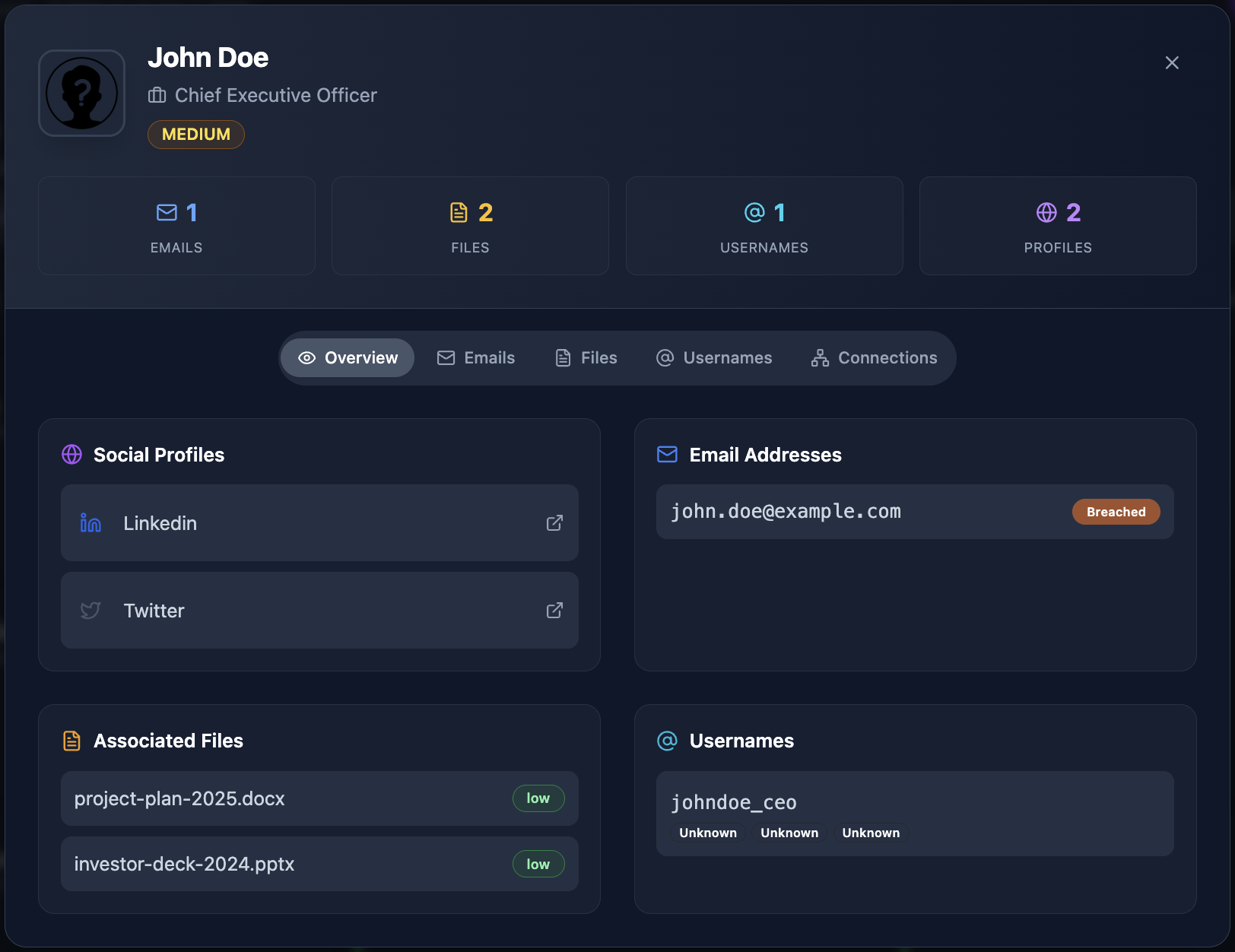
Platform registrations — Through automated account enumeration, Cyborux identifies which online services each email address is registered on. Employees with registrations across dozens of platforms have larger attack surfaces and more potential entry points for credential compromise.
Exposed documents — Google dorking discovers PDF, Office, and other documents hosted on your domain, extracting metadata that reveals author information, internal file paths, and software versions.
Related infrastructure — Subdomain enumeration, DNS analysis, and technology fingerprinting complete the picture by showing what technical assets are exposed alongside your employee data.
From Discovery to Action
The value of Cyborux is not just in discovery — it is in prioritization. Instead of treating all employees as equally at risk, you can focus your security resources on the people who are actually most exposed:
- Mandatory credential rotation for employees found in recent breaches
- Enhanced MFA enforcement for high-exposure employees in sensitive roles
- Targeted training for employees whose social media profiles reveal extensive personal and professional information
- Document metadata cleanup for files found to contain employee data
- Account cleanup guidance for employees registered on platforms they no longer use
This is the difference between generic anti-phishing programs that treat everyone the same and targeted risk reduction that addresses actual exposure. The result is measurably lower phishing risk with the same — or fewer — security resources.
Continuous Monitoring
Employee exposure is not static. New breaches expose new credentials. New employees join and bring their existing digital footprints. Existing employees sign up for new services. Documents with metadata are published, deleted, and republished.
Cyborux provides continuous monitoring so you do not discover an employee’s exposure six months after an attacker already exploited it. When a new breach includes one of your employee emails, you know immediately — not when the next quarterly assessment runs.
Building a Phishing Resilience Program Around Exposure Data
Once you have visibility into employee exposure, build a program that uses that data to drive measurable risk reduction.
Phase 1: Baseline Assessment
Run comprehensive reconnaissance against your domain to establish a baseline of employee exposure. Document:
- Total number of employee emails discovered externally
- Number of employees appearing in breach databases (and which breaches)
- Distribution of platform registrations across employees
- High-risk employees by composite exposure score
- Exposed documents containing employee metadata
This baseline tells you the current state — how your organization looks to an attacker right now.
Phase 2: Immediate Risk Reduction
Address the highest-risk findings first:
Breached credentials — Any employee whose email appears in a breach with password data should immediately:
- Reset their corporate password
- Enable MFA on all corporate accounts (if not already enforced)
- Be guided to check and update passwords on personal accounts associated with their work email
- Be informed about which breaches included their data and what information was exposed
High-exposure executives and finance staff — These individuals are the top targets for business email compromise. Ensure they have:
- Hardware security keys for MFA (not SMS)
- Out-of-band verification procedures for any financial transaction requests received via email
- Restricted public information on social media and corporate websites
Exposed documents — Remove or sanitize documents found to contain sensitive metadata. Update publishing workflows to strip metadata automatically before any document goes public.
Phase 3: Organizational Hardening
With immediate risks addressed, build sustainable processes:
- Onboarding security checks — Check new employee email addresses against breach databases on day one. Guide new hires to secure personal accounts that use their work email
- Offboarding exposure cleanup — When employees leave, ensure their work email is removed from breach notification monitoring and that accounts on corporate platforms are deactivated
- Quarterly exposure reviews — Rerun reconnaissance to identify new exposures, new breach appearances, and new platform registrations
- Policy updates — Establish clear policies for work email usage on personal platforms, document metadata handling, and social media information sharing
- Tiered phishing simulations — Run more sophisticated simulations against high-exposure employees and simpler ones against lower-risk staff, matching the simulation difficulty to the actual threat level
Phase 4: Metrics and Reporting
Measure the effectiveness of your program with metrics that reflect actual risk reduction:
- Breach exposure rate — Percentage of employees appearing in breach databases (should decrease over time through credential rotation and monitoring)
- Mean time to response — How quickly you act when an employee appears in a new breach
- Document metadata incidents — Number of externally published documents containing sensitive metadata (should trend to zero)
- Platform exposure concentration — Average number of platform registrations per employee (awareness reduces unnecessary registrations)
- Phishing simulation success — Click rates on simulations calibrated to real threat levels, not generic templates
Report these metrics in business terms: “We reduced the number of employees with active breach exposure by 60% this quarter, directly lowering our risk of credential-based phishing attacks.”
The Real Cost of Ignoring Employee Exposure
Organizations that invest in firewalls, endpoint detection, and SIEM platforms while ignoring employee data exposure are protecting the perimeter while leaving the gate open.
Consider the economics:
- The average cost of a phishing-driven breach exceeds $4.7 million (IBM Cost of a Data Breach Report)
- Over 80% of breaches involve a human element — phishing, stolen credentials, or social engineering (Verizon DBIR)
- The average organization takes over 200 days to identify a breach originating from compromised credentials
- A single compromised employee account can provide access to email, cloud storage, internal tools, and customer data
Against these numbers, the cost of proactively identifying and reducing employee exposure is negligible. Running your domain through Cyborux takes minutes and immediately reveals which employees are most at risk — before an attacker builds the same profile.
The Asymmetric Advantage
Here is the uncomfortable truth: attackers are already doing this reconnaissance against your organization. They are already checking your employee emails against breach databases, mapping your team’s digital footprints, and profiling high-value targets. The only question is whether you are doing it first.
When you identify your exposed employees before attackers do, you gain an asymmetric advantage. You can rotate credentials before they are used. You can reduce social media exposure before it feeds a phishing campaign. You can clean up document metadata before it reveals internal infrastructure. Every exposure you eliminate is one fewer data point in an attacker’s targeting profile.
Frequently Asked Questions
What are AI-driven phishing attacks?
AI-driven phishing attacks use artificial intelligence to create highly personalized phishing messages that are difficult to distinguish from legitimate communications. Unlike traditional phishing that relies on generic templates, AI-powered attacks scrape public data about targets — LinkedIn profiles, social media activity, breach records, company websites — and generate tailored emails that reference real projects, colleagues, and organizational details. The FBI has issued multiple warnings about this escalating threat, particularly targeting Gmail and corporate email users.
How do I know which employees are most vulnerable to phishing?
The most vulnerable employees are those with the highest public data exposure — not necessarily those who perform worst on phishing simulations. Check employee emails against breach databases, enumerate their platform registrations, audit their social media detail level, and assess their role sensitivity. Employees who score high across multiple dimensions are priority targets. Cyborux automates this assessment by scanning your domain and producing exposure profiles for discovered employees.
Is anti-phishing software enough to protect against modern phishing?
Anti-phishing software — email filters, URL sandboxing, attachment scanning — is essential but not sufficient on its own. Modern AI-driven phishing attacks are specifically designed to bypass technical filters by using legitimate-looking domains, clean content, and personalized messaging. Effective defense requires layering technical controls with employee exposure reduction, process controls (like out-of-band verification for financial actions), and continuous monitoring for new exposures.
How often should we check employee emails against breach databases?
Continuously. New data breaches are disclosed regularly, and the gap between a breach occurring and an attacker using the stolen credentials can be very short. At minimum, check monthly. Services like Cyborux provide continuous breach monitoring so you are alerted as soon as an employee email appears in a new breach, rather than discovering it during a periodic check.
What is the connection between OSINT and phishing defense?
OSINT (Open Source Intelligence) techniques are exactly what attackers use during the reconnaissance phase of targeted phishing. By using the same techniques defensively — email discovery, breach checking, account enumeration, social media analysis, Google dorking — organizations can see themselves as attackers see them. This visibility enables proactive exposure reduction, which is far more effective than reactive phishing detection.
Can small organizations benefit from employee exposure assessment?
Absolutely. Smaller organizations are often more vulnerable because they lack dedicated security teams to monitor exposure. A 20-person company where the CEO’s email appears in multiple breaches and the finance manager uses the same password across personal and corporate accounts is at severe risk. Automated platforms like Cyborux make exposure assessment accessible without requiring dedicated security staff — enter your domain and get results in minutes.
What should I do when an employee is found in a breach database?
Immediate actions: force a password reset on all corporate accounts, verify MFA is enabled (enforce it if not), check access logs for any unauthorized activity during the exposure window, and inform the employee about which platforms were breached and what data was exposed. Longer term: guide the employee to check and update passwords on personal accounts that may share the same credentials, and add them to enhanced phishing simulation and monitoring.
How does reducing employee exposure help with compliance?
Regulations like GDPR, HIPAA, and SOC 2 require organizations to protect personal data and implement reasonable security measures. Proactively monitoring for employee credential exposure in breach databases and reducing unnecessary public data exposure demonstrates due diligence. Continuous monitoring platforms provide audit trails showing when exposures were detected and how they were remediated — documentation that is valuable during compliance audits and incident investigations.
Conclusion
Phishing attacks succeed because of information asymmetry. Attackers know more about your employees than you do — which emails are in breach databases, which platforms they use, what projects they work on, and who they report to. When that information feeds an AI-powered phishing engine, the resulting attacks are virtually undetectable through training alone.
The solution is not better training. It is better visibility. Know what attackers can find about your employees before they find it. Reduce the exposure that makes targeted phishing possible. Monitor for new exposures continuously so your defense keeps pace with the evolving threat.
This is not a technology problem that requires a massive security budget. It is a visibility problem that requires looking at your organization from the outside in — the same perspective an attacker uses.
Cyborux makes that visibility accessible. Enter your domain and see your organization’s employee exposure — emails in breach databases, platform registrations, exposed documents, and more. No tools to install, no scripts to maintain, no expertise required. Just the visibility you need to identify your most exposed employees and reduce their risk before an attacker exploits it.
Your attackers are already profiling your employees. The only question is whether you are doing it first.