
MCP Server
Use Cyborux directly from Claude, Cursor, and other AI assistants via the Model Context Protocol.
The Cyborux MCP server connects your AI assistant to the Cyborux API using the Model Context Protocol (MCP) — an open standard that lets LLMs call external tools securely. Instead of copying data between apps, you ask questions in natural language and the AI calls the right Cyborux endpoints automatically.
What You Can Do
With the Cyborux MCP integration you can ask your AI assistant to:
- Assess domain security — "What's the risk score for example.com? What are the main concerns?"
- Investigate email breaches — "Which emails on example.com have been in data breaches? Show me breach details for the most exposed one."
- Audit subdomains — "List all active subdomains sorted by risk. Are any vulnerable to takeover?"
- Find exposed people — "Who are the most exposed people at example.com? What data has been leaked about the CEO?"
- Search across everything — "Search for 'john' across all data we have on example.com"
- Generate reports — "Generate a PDF security report for example.com"
Setup
Install Node.js
The Cyborux MCP server runs on Node.js. Make sure npm is available in your terminal:
node --versionIf not installed, download it from nodejs.org (LTS recommended).
Get Your API Key
Sign in at cyborux.com and go to API Tokens. Create a new token — it starts with cbrx_. Copy it immediately; it's only shown once.
Configure Claude Desktop
Open Claude Desktop settings and go to Developer → Edit Config:
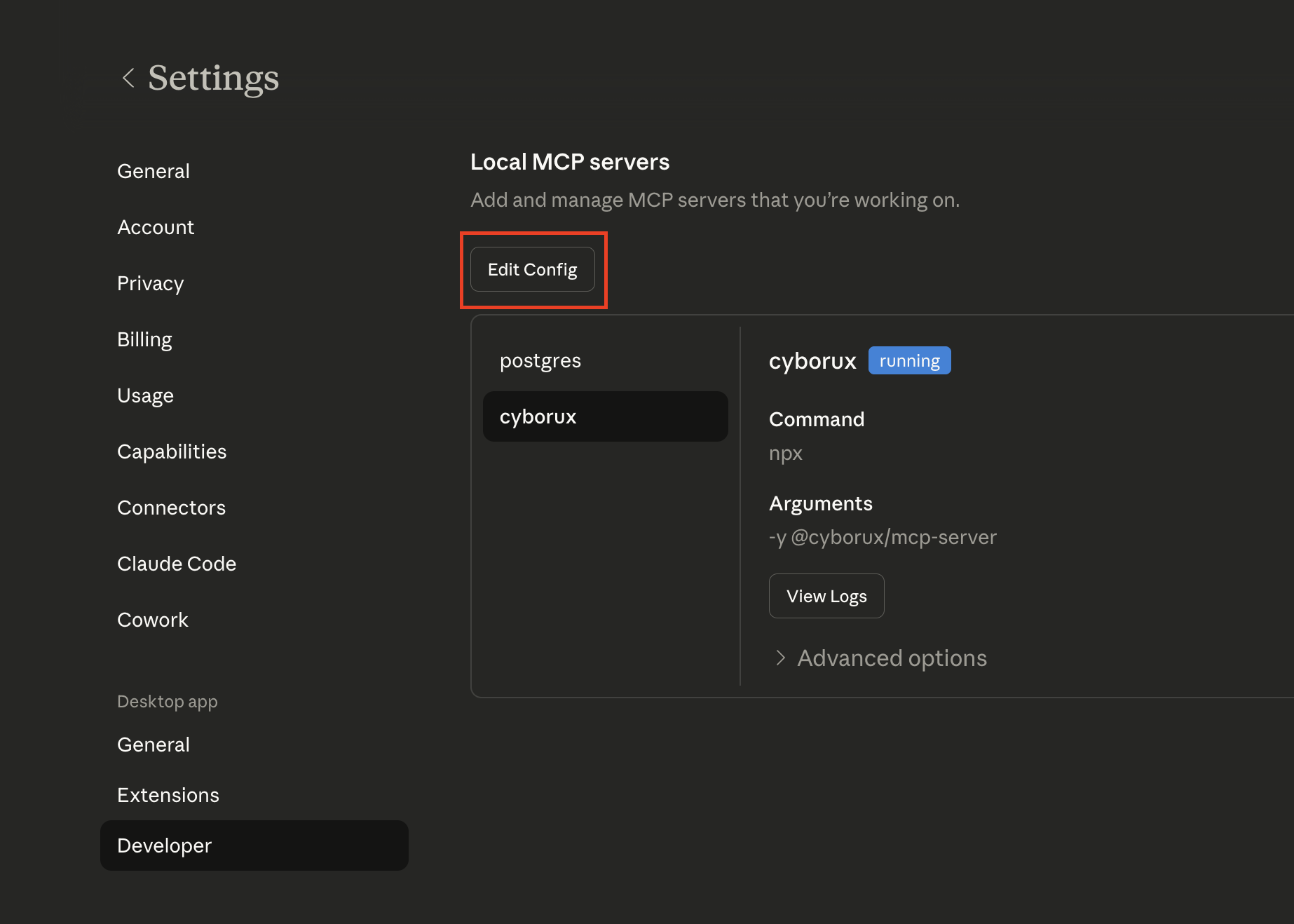
This will open the folder containing claude_desktop_config.json. Open this file with your favourite editor:
~/Library/Application Support/Claude/claude_desktop_config.json%APPDATA%\Claude\claude_desktop_config.jsonAdd the Cyborux MCP server:
{
  "mcpServers": {
    "cyborux": {
      "command": "npx",
      "args": ["-y", "@cyborux/mcp-server"],
      "env": {
        "CYBORUX_API_KEY": "cbrx_your_token_here"
      }
    }
  }
}
Replace cbrx_your_token_here with the API token you created in step 2.
Restart Claude Desktop
Close and reopen Claude Desktop. The Cyborux integration will be available immediately — look for the hammer icon with 18 tools.
Verify
Ask Claude:
"List my domains on Cyborux"
It should call the list_domains tool and return your monitored domains.
Other Clients
claude mcp add cyborux \
  -e CYBORUX_API_KEY=cbrx_your_token_here \
  -- npx -y @cyborux/mcp-server
Open Settings → MCP Servers and add:
{
  "mcpServers": {
    "cyborux": {
      "command": "npx",
      "args": ["-y", "@cyborux/mcp-server"],
      "env": {
        "CYBORUX_API_KEY": "cbrx_your_token_here"
      }
    }
  }
}
Available Tools
Domain Analysis
| Tool | Description |
|---|---|
list_domains | List all monitored domains with risk scores and status |
analyze_domain | Start a new OSINT analysis for a domain |
domain_summary | Risk score, security metrics, WHOIS/DNS, and analysis progress |
search_domain | Search across all entity types in a single query |
Discovered Assets
| Tool | Description |
|---|---|
list_emails | Email addresses with breach counts and leak status |
email_breaches | Breach timeline for a specific email |
list_people | People profiles with linked entity counts |
person_details | Full person detail with emails, files, and usernames |
list_files | Discovered files with extracted metadata |
list_subdomains | Subdomains with active status and takeover risk |
subdomain_details | Technologies and vulnerabilities for a subdomain |
list_usernames | Usernames and handles discovered for the domain |
Infrastructure
| Tool | Description |
|---|---|
list_infrastructure | Internal IPs, server names, and printer paths leaked in documents |
list_related_domains | Related domains discovered through OSINT linkage |
Reports & Account
| Tool | Description |
|---|---|
generate_domain_report | Generate a PDF analysis report |
subscription_status | Current plan, usage, and credit balances |
Environment Variables
| Variable | Required | Description |
|---|---|---|
CYBORUX_API_KEY | Yes | Your API token (starts with cbrx_) |
Troubleshooting
Tools not appearing?
Make sure you restarted the client after editing the config. Check that npx is available in your PATH by running npx --version in your terminal.
Authentication errors?
Verify your CYBORUX_API_KEY starts with cbrx_ and that your subscription is active.
"Domain not found" errors?
You need to run an analysis on a domain before querying it. Use the analyze_domain tool first.