Infrastructure Exposure: What Your Network Reveals to Attackers Before They Even Knock
A security analyst types your domain into a reconnaissance tool. Within minutes, they have a complete map: every cloud provider you use, which subdomains share servers, which internal IP ranges you accidentally published to public DNS, and the names of internal servers buried in PDF metadata your marketing team uploaded three years ago.
They didn’t hack anything. They didn’t scan a single port. Everything they found was publicly available — discoverable by anyone with the right tools and methodology.
This is infrastructure reconnaissance, and it’s the first step in virtually every targeted attack. Understanding what your network reveals to outsiders isn’t optional — it’s the foundation of modern defense.
What Is External Infrastructure Exposure?
External infrastructure exposure refers to the information about your organization’s technical environment that can be gathered from publicly available sources — without any intrusive scanning or exploitation.
This includes:
- IP addresses and which cloud providers or data centers host them
- DNS records that reveal internal network structure
- Reverse DNS (PTR records) that expose service names and hosting details
- Document metadata that leaks internal server names, file paths, and operating systems
- Shared infrastructure where related domains resolve to the same IP addresses
Unlike vulnerability scanning (which actively probes systems), infrastructure reconnaissance is entirely passive. It uses DNS queries, certificate transparency logs, WHOIS data, and publicly accessible file metadata. This makes it legal, undetectable, and routinely performed by both security professionals and threat actors.
The critical difference? Security professionals use this information to identify and remediate weaknesses. Attackers use it to plan their approach.
What Can Be Discovered — and Why It Matters
Cloud Provider and Hosting Topology
Every domain resolves to IP addresses, and every IP address carries metadata: the Autonomous System Number (ASN), the organization that owns it, the geolocation, and often the cloud provider.
When an analyst maps your infrastructure, they see something like this:
This tells an attacker where to focus. Cloud-hosted services (Cloudflare, AWS) likely have stronger perimeter defenses. But the 47 IPs on the organization’s own network? Those are self-managed servers — often with weaker patching cycles, older configurations, and less scrutiny.
Hosting topology reveals your security posture at a glance. A multi-cloud setup with dozens of self-hosted IPs suggests a complex environment where misconfigurations are more likely. Attackers prioritize the weakest link.
Private IPs Leaked via Public DNS
This is one of the most common — and most overlooked — DNS misconfigurations. A subdomain like librenms.example.com resolves to 192.168.115.108 via a standard DNS query. Anyone can discover this.
$ dig librenms.example.com +short
192.168.115.108
The IP is in the RFC 1918 private range (192.168.x.x), meaning it was intended for internal use only. But the DNS A record is public — visible to anyone who queries it.
This happens when:
- Internal services get public DNS records during setup and are never cleaned up
- Split-horizon DNS fails — the internal zone leaks to external resolvers
- Staging or development environments are configured with public DNS for convenience
A single leaked private IP tells an attacker which subnet your internal services use. Multiple leaked IPs paint a detailed picture of your internal network topology — VPN gateways, monitoring systems, internal wikis, staging environments.
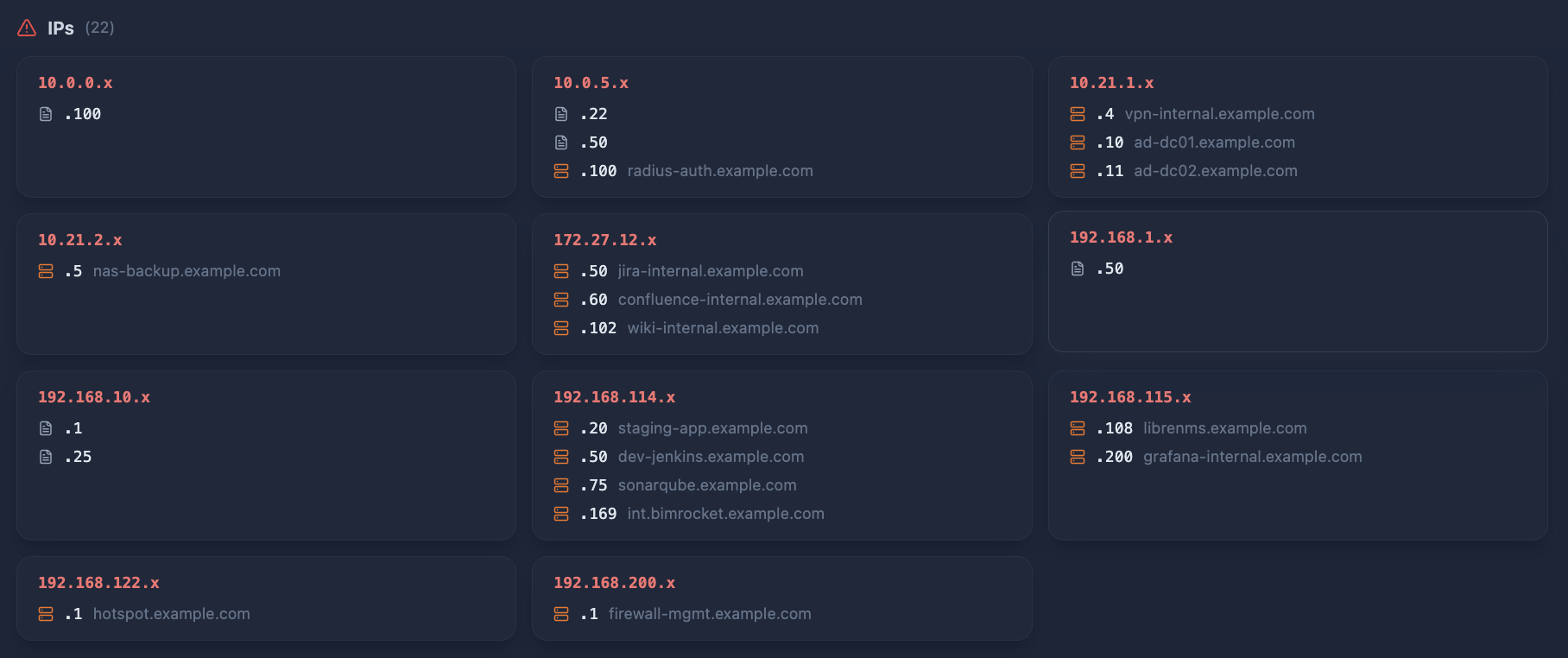
Private IPs in public DNS give attackers a network map for free. Once they gain internal access (via phishing, VPN compromise, or an exposed service), they know exactly which subnet to target and what services are running on it.
Reverse DNS and Service Identification
Reverse DNS (PTR records) map IP addresses back to hostnames. While often overlooked, PTR records frequently reveal the exact service running on an IP:
ec2-52-213-180-67.eu-west-1.compute.amazonaws.com— AWS EC2 instance in Irelandmail-relay.example.com— Internal mail infrastructuredb-replica-02.example.com— Database replication server
PTR records are configured by whoever controls the IP range. Cloud providers set them automatically (exposing instance metadata), while self-hosted infrastructure often reveals internal naming conventions.
Combined with forward DNS and subdomain enumeration, reverse DNS creates a bidirectional map: subdomain → IP → hostname → service purpose.
Internal Infrastructure Leaked Through Documents
This is the category most organizations are completely unaware of. Every document — PDF, DOCX, PPTX, XLSX — carries metadata embedded by the software that created it. This metadata can include:
- File paths revealing internal server structure (
\\SRV-PROD01\Shared\Projects\...) - Server names and Windows UNC paths (
\\FILESERVER-PROD01) - Printer names and network paths (
\\PRINT-SRV\HP-LJ-4200) - Operating systems and software versions (
Windows NT 4.0,Mac OS X 10.6.5) - Private IP addresses embedded in XMP metadata
The data is surprisingly rich. An organization publishing hundreds of reports, presentations, and administrative documents over a decade will leak dozens of internal server names, file paths, and workstation details — all from files that are still publicly accessible on their website or cached in web archives.
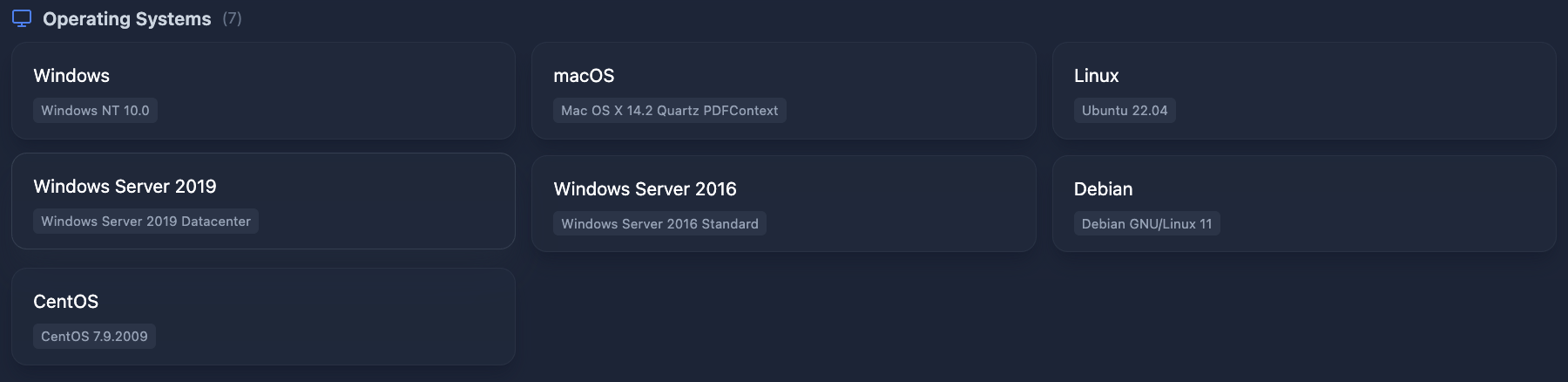
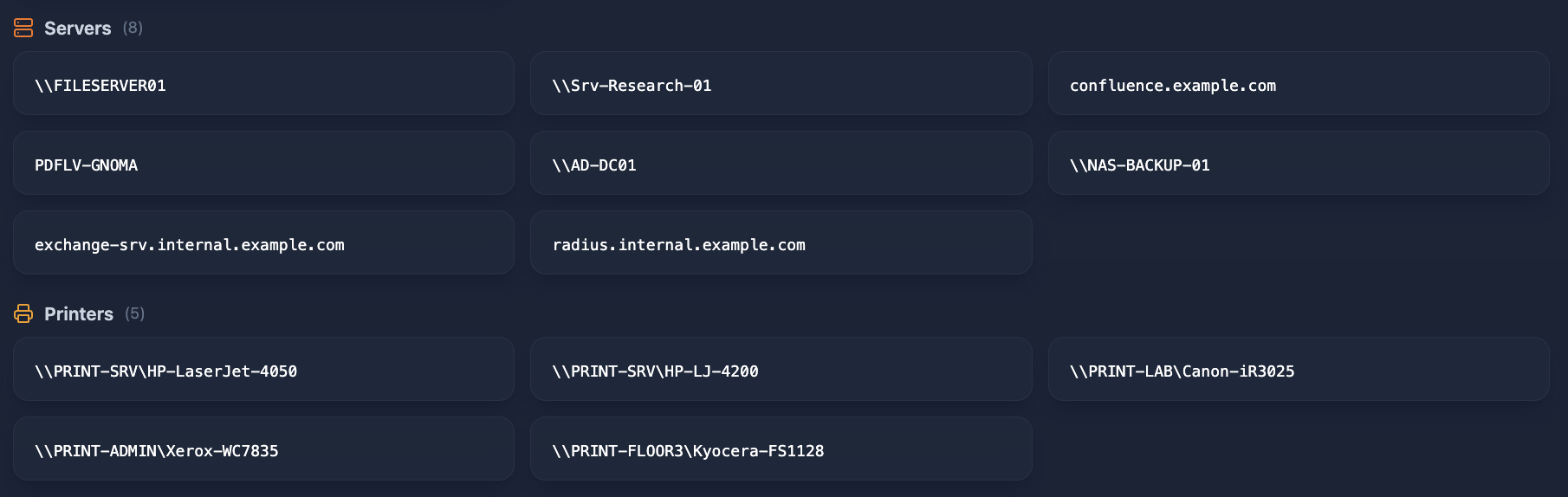
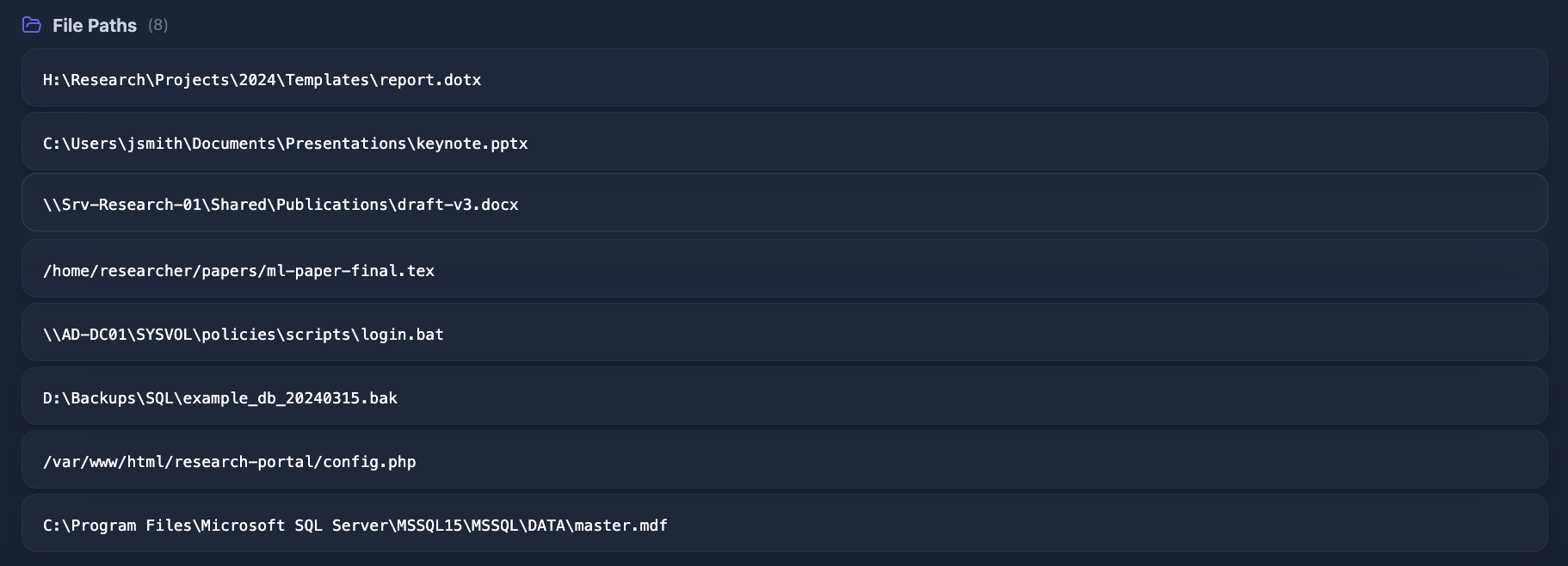
Document metadata provides intelligence that isn’t available from any network scan. Internal server names reveal naming conventions. File paths expose directory structures. Operating system versions identify potentially unpatched systems. This information is gold for an attacker planning lateral movement after initial access.
Shared Infrastructure and Related Domains
Related domains — domains owned by the same organization or tightly linked to the primary domain — sometimes resolve to the same IP addresses as your subdomains. When this happens, it indicates shared infrastructure.
For example, if research-lab.example.org resolves to the same Azure IP as api.example.com, an attacker knows:
- Both organizations share the same server (or load balancer)
- Compromising one may provide access to the other
- The blast radius of any vulnerability extends beyond a single domain
This is particularly relevant for organizations with multiple domains (brand variations, regional sites, partner portals) or those using shared hosting environments.
The Risk Landscape: From Reconnaissance to Exploitation
Infrastructure exposure isn’t a vulnerability by itself — it’s the intelligence that makes every subsequent attack more efficient. Here’s how attackers use each category:
The compound effect is what makes infrastructure reconnaissance so powerful. A leaked private IP alone is informational. But combined with an exposed VPN subdomain, leaked employee credentials from a data breach, and a spoofable email domain, it becomes one piece of a complete attack chain.
Continuous Monitoring vs. Point-in-Time Assessment
Infrastructure exposure is not static. New subdomains are created, DNS records change, documents are published, cloud resources are provisioned. A security assessment performed in January may miss critical exposures introduced in March.
This is why organizations are moving from periodic assessments to continuous monitoring. The difference:
- Point-in-time assessment: Snapshot of your infrastructure on a specific date. Useful for compliance, but exposures introduced afterward go undetected until the next assessment.
- Continuous monitoring: Ongoing detection of changes to your external infrastructure. New subdomains, DNS changes, and published documents are identified as they appear.
Platforms like Cyborux automate this process — continuously mapping your external infrastructure, detecting new exposures, and correlating findings across your entire attack surface. Instead of running separate tools for DNS reconnaissance, subdomain enumeration, document metadata extraction, and certificate monitoring, you get a unified view that shows how these elements connect.
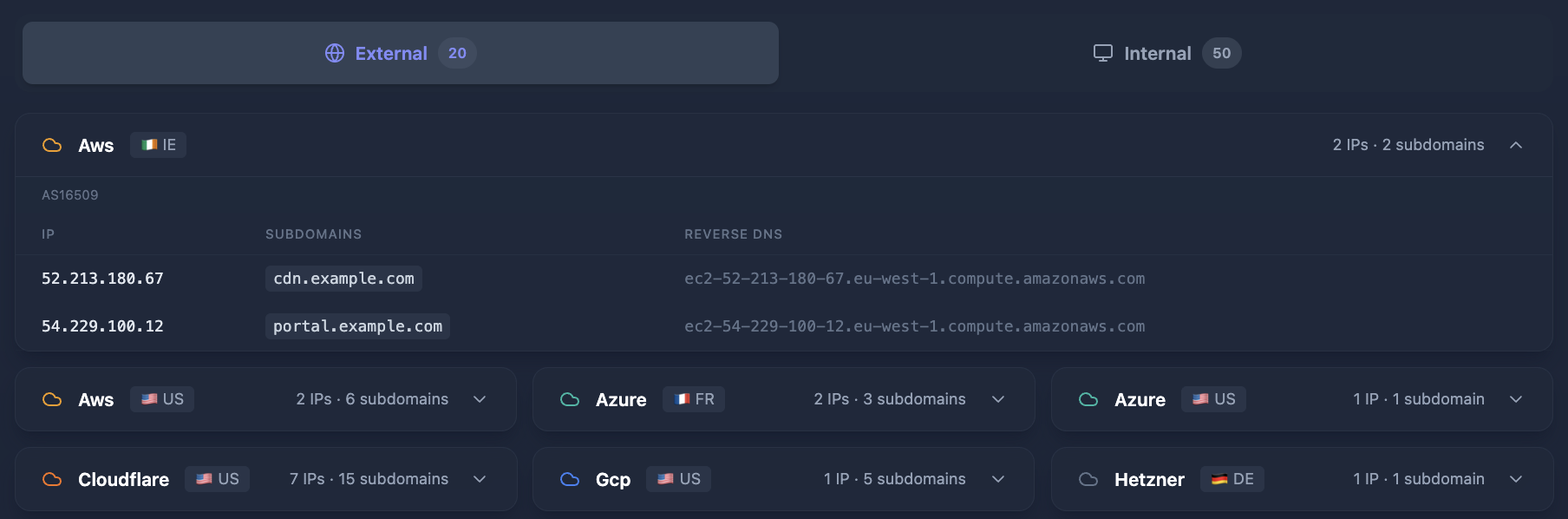
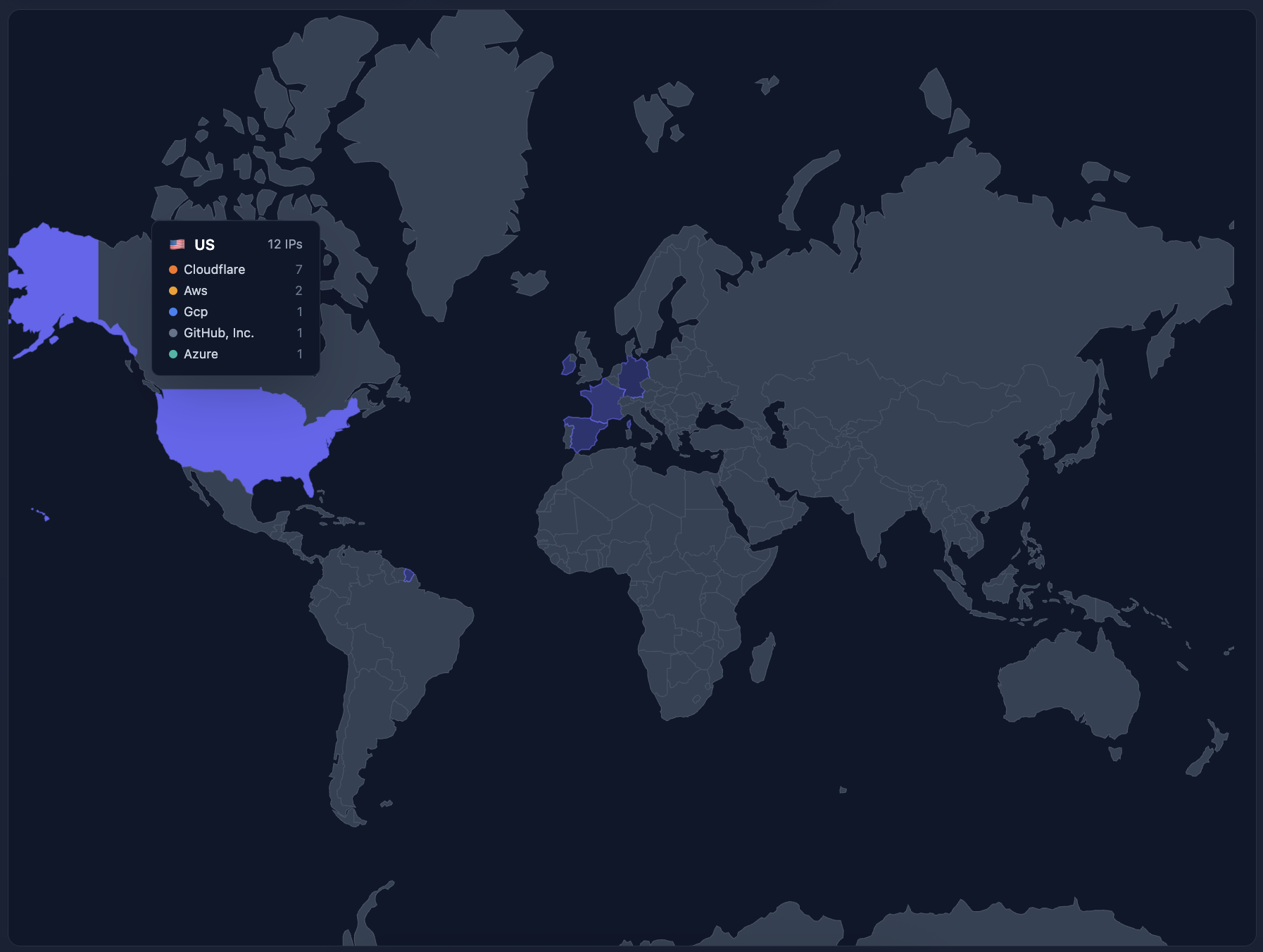
The infrastructure view groups your external IPs by provider and country, shows which subdomains resolve to each IP, and highlights when related domains share the same infrastructure — making it immediately clear where your exposure is concentrated.
Know your infrastructure exposure
See what your network reveals to outsiders — cloud providers, leaked IPs, internal servers, and shared infrastructure — in one unified view.
Map Your InfrastructureNo agents, no port scanning. Passive reconnaissance only.
Practical Mitigation: Reducing Your Infrastructure Exposure
DNS Hygiene
Audit public DNS records regularly. Remove A records pointing to private IP ranges (10.x.x.x, 172.16-31.x.x, 192.168.x.x). These should never exist in public DNS zones.
Implement split-horizon DNS for internal services. Internal DNS resolvers serve internal records; public DNS only contains what should be externally accessible.
Remove orphaned records. When decommissioning a service, remove its DNS records. Dangling CNAME records pointing to unclaimed cloud resources are a subdomain takeover risk.
Document Metadata Scrubbing
Strip metadata before publishing. Use tools like exiftool -all= document.pdf to remove metadata from documents before uploading them to public-facing websites.
Implement automated scrubbing pipelines. Configure your CMS or document management system to automatically strip metadata on upload. Most modern systems support this.
Audit existing published documents. The most dangerous metadata is in documents published years ago — annual reports, research papers, policy documents. These are often cached by search engines and web archives, making removal difficult but the audit essential.
Infrastructure Segmentation
Separate internal and external naming. Don’t use internal server names that reveal function (e.g., dc01-prod, sql-backup-03). Use opaque identifiers for externally visible infrastructure.
Minimize cloud metadata in PTR records. While you can’t control cloud provider PTR records (like ec2-*.compute.amazonaws.com), you can minimize the number of dedicated IPs that expose instance metadata by using load balancers and CDN edge networks.
Shared Infrastructure Awareness
Monitor which domains share your infrastructure. If a partner’s domain resolves to the same IP as your critical service, you share their risk profile. Regularly verify that shared infrastructure is intentional and appropriately segmented.
Use dedicated IPs for critical services. Shared hosting and shared load balancers mean shared risk. Critical services should have dedicated, isolated infrastructure.
The Connection to Your Broader Attack Surface
Infrastructure exposure doesn’t exist in isolation. It connects directly to other attack surface categories:
- Leaked private IPs + exposed employee credentials = targeted internal access after credential stuffing
- Internal server names from metadata + exposed VPN subdomain = precise targeting after initial breach
- Cloud provider mapping + outdated technology detection = focused vulnerability exploitation
- Shared infrastructure + subdomain takeover risk = cross-domain attack chains
This correlation is where automated platforms provide the most value. Manually cross-referencing DNS data, document metadata, hosting information, and credential exposure across hundreds of assets is impractical. Tools that unify these data sources and surface correlated risks — like the attack chain detection in Cyborux — transform raw reconnaissance data into actionable intelligence.
Key Takeaways
-
Infrastructure exposure is inevitable. DNS records, certificates, and document metadata are public by design. The question is whether you know what they reveal.
-
Private IPs in public DNS are a common, high-impact misconfiguration. They’re easy to detect and easy to fix — yet most organizations don’t know they exist until an attacker or an assessment finds them.
-
Document metadata is an underestimated leak vector. Files published years ago still reveal internal server names, operating systems, and network paths. Automated metadata extraction is a standard part of modern reconnaissance.
-
Shared infrastructure creates shared risk. When related domains share IP addresses, the blast radius of any compromise extends beyond a single domain.
-
Continuous monitoring beats periodic assessment. Your infrastructure changes constantly. Monthly or quarterly snapshots miss exposures introduced between assessments.
Understanding your external infrastructure exposure is the first step toward managing it. Whether you’re a security consultant scoping an engagement, an IT manager auditing your organization’s footprint, or a CISO building a risk management program, the data is there — the question is who finds it first.
Start by mapping what’s visible. Cyborux makes this accessible — enter any domain and see your infrastructure exposure in minutes, with no agents, no port scanning, and no intrusive testing.
Related reading: