DMARC, SPF, and DKIM: How to Stop Email Spoofing and Protect Your Domain
Your CFO receives an email from the CEO. It is from the CEO’s exact email address — not a lookalike, not a misspelled domain, but the real address. The email references an acquisition the leadership team discussed yesterday and asks the CFO to wire $340,000 to an escrow account before end of day. The email signature, tone, and formatting all match previous legitimate messages.
The CFO initiates the transfer. By the time anyone realizes the email was forged, the money is gone.
This is email spoofing — and it is possible because the company’s domain had no SPF record, no DKIM signing, and no DMARC policy. The attacker did not need to hack anything. They did not compromise anyone’s account. They simply sent an email pretending to be the CEO, and nothing in the email infrastructure stopped it — or even flagged it.
The three protocols that prevent this — SPF, DKIM, and DMARC — have been around for years. They are free. They require no software to install. Setting them up takes an afternoon. Yet a staggering number of organizations still have not implemented them properly, leaving their domains wide open to impersonation.
This guide covers what SPF, DKIM, and DMARC actually do, how to set each one up correctly, the common misconfigurations that leave domains vulnerable even when records exist, and how to verify that your domain cannot be spoofed for phishing attacks.
What Is Email Spoofing and Why Should You Care?
Email spoofing is the act of sending an email with a forged sender address. The recipient sees an email that appears to come from a trusted source — a colleague, a vendor, a bank — but was actually sent by someone else entirely.
The SMTP protocol, designed in the early 1980s, has no built-in sender verification. Any mail server can claim to send email on behalf of any domain. Without additional authentication mechanisms, there is nothing preventing an attacker from sending an email as ceo@yourcompany.com to anyone in the world.
The Business Impact
Email spoofing is not a theoretical risk. It is the foundation of business email compromise (BEC), which the FBI’s IC3 reports as consistently the most financially damaging cybercrime category — accounting for over $2.9 billion in reported losses in 2023 alone (FBI IC3 Annual Report).
Beyond direct financial fraud, spoofed emails damage brand reputation, erode customer trust, and can lead to regulatory penalties. When a customer receives a phishing email from your domain and falls for it, they blame your company — not the attacker.
Email spoofing prevention starts with three DNS-based authentication protocols: SPF, DKIM, and DMARC. Together, they allow receiving mail servers to verify that an email actually came from someone authorized to send on behalf of your domain — and to reject or quarantine messages that fail verification.
SPF: Defining Who Can Send Email for Your Domain
Sender Policy Framework (SPF) is the first layer of email authentication. It allows domain owners to publish a DNS record that specifies which mail servers are authorized to send email on behalf of their domain.
How SPF Works
When an email arrives at a receiving mail server, the server checks the sender’s domain for an SPF record — a TXT record in DNS. This record lists the IP addresses and mail servers that are allowed to send email for that domain. If the sending server’s IP address matches one of the authorized sources, the SPF check passes. If not, it fails.
The process is straightforward:
- Sender’s mail server connects to recipient’s mail server
- Recipient server checks the
MAIL FROMdomain for an SPF TXT record - SPF record lists authorized sending IPs and mechanisms
- Recipient server compares sender’s IP against the authorized list
- Result:
pass,fail,softfail,neutral, ornone
Setting Up Your SPF Record
An SPF record is a TXT record added to your domain’s DNS. Here is the anatomy of a typical SPF record:
v=spf1 ip4:203.0.113.0/24 include:_spf.google.com include:sendgrid.net -allLet’s break down each component:
SPF Record Examples by Use Case
Google Workspace only:
v=spf1 include:_spf.google.com -allMicrosoft 365 only:
v=spf1 include:spf.protection.outlook.com -allGoogle Workspace + SendGrid (transactional emails):
v=spf1 include:_spf.google.com include:sendgrid.net -allMultiple services with dedicated IP:
v=spf1 ip4:198.51.100.5 include:_spf.google.com include:amazonses.com -allCritical SPF Pitfalls
The DNS lookup limit. SPF allows a maximum of 10 DNS lookups per record. Each include:, a, mx, and redirect mechanism counts as a lookup. Nested includes count toward the total. Exceeding 10 lookups causes a permerror — your SPF check fails for everyone.
If you use multiple email services (marketing, transactional, CRM, helpdesk), you can hit this limit quickly. Monitor your lookup count and consider SPF flattening if needed.
Using +all or ?all. These effectively disable SPF by allowing any server to send as your domain. Always use -all (hardfail) or at minimum ~all (softfail). Never use +all.
Forgetting to include all sending services. Every service that sends email using your domain needs to be in your SPF record — including marketing platforms, CRM systems, helpdesk software, and transactional email providers. Missing one means legitimate emails from that service may be rejected.
DKIM: Cryptographic Proof That Email Was Not Tampered With
DomainKeys Identified Mail (DKIM) adds a digital signature to every outgoing email, allowing the receiving server to verify that the message was actually sent by an authorized server and that the content was not modified in transit.
How DKIM Works
DKIM uses public-key cryptography:
- Your mail server generates a private/public key pair
- The private key stays on your mail server and is used to sign outgoing emails
- The public key is published as a DNS TXT record on your domain
- When an email is sent, the server creates a cryptographic hash of specific email headers and body content, then signs that hash with the private key
- The receiving server retrieves the public key from DNS and uses it to verify the signature
- If the signature is valid, the email has not been tampered with and was sent by a server with access to the private key
Unlike SPF, which only validates the sending server’s IP address, DKIM validates the integrity of the message itself. Even if an attacker intercepts and modifies the email in transit, the DKIM signature will break, and the receiving server will flag the message.
Setting Up DKIM
DKIM setup varies by email provider, but the concept is the same everywhere:
Step 1: Generate your DKIM keys. Most email providers (Google Workspace, Microsoft 365, etc.) generate DKIM keys for you automatically. You just need to enable signing and publish the public key.
Step 2: Publish the public key in DNS. Add a TXT record with the selector and public key. The record name follows this format:
selector._domainkey.yourdomain.comA Google Workspace DKIM record looks like this:
google._domainkey.yourdomain.com TXT "v=DKIM1; k=rsa; p=MIIBIjANBg..."Step 3: Enable DKIM signing. In your email provider’s admin console, enable DKIM signing for your domain. The provider’s mail servers will then sign every outgoing email with your private key.
Step 4: Verify. Send a test email and check the headers. You should see a DKIM-Signature header and the receiving server’s authentication results should show dkim=pass.
DKIM Best Practices
- Use 2048-bit keys instead of 1024-bit. Longer keys are significantly harder to brute-force.
- Rotate keys periodically. Generate new key pairs at least annually. Publish the new public key alongside the old one (using a different selector), switch signing to the new key, then remove the old key after a transition period.
- Sign with multiple services. If you use Google Workspace and a transactional email provider like SendGrid, each service should have its own DKIM selector and key pair. Both public keys are published in DNS.
DMARC: The Policy Layer That Ties Everything Together
Domain-based Message Authentication, Reporting, and Conformance (DMARC) is the policy layer that tells receiving mail servers what to do when SPF or DKIM checks fail. Without DMARC, even if SPF and DKIM are configured, receiving servers have no instruction on how to handle failures — they might deliver the spoofed email anyway.
DMARC also adds alignment — a requirement that the domain in the From: header (what the recipient sees) must match the domain validated by SPF or DKIM. This closes a critical gap: without DMARC alignment, an attacker could pass SPF using their own domain while forging the visible From: address to show yours.
How DMARC Works
- An email arrives at the receiving mail server
- The server checks SPF and DKIM as usual
- The server then checks whether the domain in the visible
From:header aligns with the domain that passed SPF or DKIM - If alignment fails — meaning the email claims to be from your domain but SPF/DKIM passed for a different domain — DMARC kicks in
- The server looks up your DMARC policy (a DNS TXT record at
_dmarc.yourdomain.com) to determine what to do with the failed message
DMARC Policies: none, quarantine, reject
The DMARC policy (p= tag) tells receiving servers how to handle emails that fail authentication:
The critical point: if your DMARC policy is not enabled or is set to p=none, your domain can still be spoofed. A p=none policy is a monitoring mode — it generates reports but does nothing to stop spoofed emails from reaching inboxes. Many organizations deploy p=none as a first step and never progress to enforcement, leaving their domain vulnerable indefinitely.
When a security scanner reports that a DMARC quarantine/reject policy is not enabled, it means exactly this — the domain either has no DMARC record at all, or it has one with p=none that provides zero protection against spoofing.
Setting Up Your DMARC Record
A DMARC record is a TXT record at _dmarc.yourdomain.com. Here is a complete example:
_dmarc.yourdomain.com TXT "v=DMARC1; p=reject; rua=mailto:dmarc-reports@yourdomain.com; ruf=mailto:dmarc-forensics@yourdomain.com; adkim=s; aspf=s; pct=100"The DMARC Rollout Strategy
Moving directly to p=reject without monitoring will break legitimate email flows you forgot about. The safe approach is a phased rollout:
Phase 1 — Monitor (2-4 weeks)
v=DMARC1; p=none; rua=mailto:dmarc-reports@yourdomain.comDeploy with p=none and a reporting address. Collect aggregate reports for at least two weeks. These XML reports show every server that sent email using your domain — both legitimate services you authorized and unauthorized senders (potential spoofing attempts). Use a DMARC report analyzer to parse the XML into readable dashboards.
Phase 2 — Quarantine (2-4 weeks)
v=DMARC1; p=quarantine; pct=25; rua=mailto:dmarc-reports@yourdomain.comMove to p=quarantine with a low percentage. Start with pct=25 — meaning only 25% of failing emails get quarantined. Monitor reports for false positives (legitimate emails being quarantined). If everything looks clean, ramp up to pct=50, then pct=100.
Phase 3 — Reject
v=DMARC1; p=reject; rua=mailto:dmarc-reports@yourdomain.com; adkim=s; aspf=s; pct=100Full enforcement. All emails failing SPF and DKIM alignment are rejected outright. This is the target state for email spoofing prevention — spoofed emails never reach anyone’s inbox.
How SPF, DKIM, and DMARC Work Together
Each protocol addresses a different aspect of email authentication. None of them is sufficient alone — their strength comes from working together:
SPF answers: “Was this email sent from an authorized server?”
DKIM answers: “Was this email signed by the domain owner and unmodified in transit?”
DMARC answers: “Does the visible sender domain match the authenticated domain, and what should happen if it does not?”
Here is the complete authentication flow when a recipient’s mail server receives an email claiming to be from your-domain.com:
Why All Three Are Necessary
SPF alone is not enough. SPF validates the server that transmitted the email, but not the visible From: address. An attacker can send email from their own SPF-authorized server while forging the From: header to show your domain. Without DMARC alignment, SPF passes — for the attacker’s domain — while your domain appears in the From: header.
DKIM alone is not enough. DKIM proves an email was signed by a specific domain, but without DMARC, there is no policy telling the receiving server what to do when the DKIM signature does not match the From: domain.
DMARC without SPF and DKIM has nothing to enforce. DMARC is a policy layer — it evaluates the results of SPF and DKIM and applies a policy. If neither SPF nor DKIM is configured, there is nothing for DMARC to evaluate.
The minimum viable configuration for email spoofing prevention: SPF record with -all, DKIM signing enabled, and DMARC with p=reject or p=quarantine.
Common Misconfigurations That Leave Your Domain Exposed
Having SPF, DKIM, and DMARC records in DNS does not automatically mean your domain is protected. Many organizations have records that look correct but contain configuration errors that undermine the entire system.
The “Set and Forget” Problem
The most dangerous misconfiguration is the one that was correct two years ago but is no longer accurate. Organizations add a new email marketing platform, forget to update the SPF record, and legitimate marketing emails start failing authentication. Instead of updating the SPF record, someone changes DMARC to p=none to “fix” the delivery issue — and leaves it there permanently.
This is why DMARC reporting (rua) is essential. Regular review of aggregate reports reveals unauthorized senders attempting to spoof your domain and legitimate senders that need to be added to your SPF record.
How Attackers Exploit Missing Email Authentication
Understanding how to prevent email spoofing requires understanding how attackers exploit the absence of these protections. The reconnaissance is trivial — and it is exactly the kind of OSINT analysis that any security professional (or attacker) can perform in minutes.
Step 1: Check DNS Records
An attacker starts by querying your domain’s DNS records. A single dig command reveals whether SPF, DKIM, and DMARC are configured:
# Check SPF
dig +short TXT yourdomain.com | grep spf

# Check DMARC
dig +short TXT _dmarc.yourdomain.com

# Check DKIM (requires knowing the selector)
dig +short TXT google._domainkey.yourdomain.com
If the SPF record is missing or uses +all, the attacker knows that any server can send email as your domain. If there is no DMARC record, or the DMARC policy is p=none, they know that spoofed emails will be delivered even if SPF or DKIM fail. This is exactly what Cyborux checks automatically when analyzing a domain — and what it flags as a high-severity finding when misconfigured.
Step 2: Harvest Target Emails
With the domain confirmed as spoofable, the attacker harvests employee email addresses using public sources — LinkedIn, company website, GitHub commit histories, Google dorking, breach databases. The goal is to identify high-value targets: executives with financial authority, IT admins with system access, or HR staff who routinely open attachments from external senders.
Step 3: Craft and Send the Spoofed Email
Using a simple script or an open-source tool, the attacker sends an email with a forged From: header matching a real employee. The email is sent from their own mail server, but because your domain lacks enforcement:
- No SPF
hardfail— The attacker’s IP is not rejected - No DKIM signature expected — The receiving server does not require one from your domain
- No DMARC enforcement — Even if SPF or DKIM fail, the email is delivered normally
The recipient sees an email from ceo@yourdomain.com in their inbox. Nothing about it looks suspicious. The attack succeeds.
The Compound Effect with Other Exposures
Email spoofing becomes even more dangerous when combined with other attack surface exposures:
- Spoofable domain + exposed employee data = Highly targeted phishing that references real people, projects, and organizational details
- Spoofable domain + discovered email pattern = The attacker can predict and forge emails for any employee, even ones not yet discovered
- Spoofable domain + exposed technologies = Phishing emails that reference real internal tools and platforms, making them more believable
- Spoofable domain + breached credentials = Attacker can use real passwords in phishing pretexts (“we detected unauthorized access to your account”)
This is why email authentication cannot be evaluated in isolation. It is one component of your organization’s overall external attack surface, and its absence amplifies every other exposure.
Is your domain spoofable?
Cyborux automatically checks your domain's SPF, DKIM, and DMARC configuration and flags email spoofing vulnerabilities. Enter your domain — results in minutes, no tools to install.
Check Your DomainHow Cyborux Detects Email Spoofing Vulnerabilities
Checking DNS records manually works for one domain. But when you need to assess your organization’s full email security posture — including third-party domains used by vendors, partners, and acquired companies — manual checks do not scale.
Cyborux performs this assessment automatically as part of its domain reconnaissance. When you enter a domain, the platform:
Checks DMARC policy. Cyborux queries the _dmarc subdomain for your domain and evaluates the policy. If the DMARC record is missing, set to p=none, or has other configuration weaknesses, it flags the domain as spoofable.
Analyzes SPF configuration. The platform checks your SPF record for common issues — missing records, permissive +all or ?all qualifiers, excessive DNS lookups, and incomplete sender authorization.
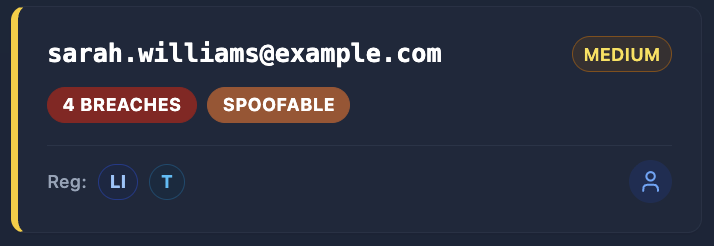
Evaluates all discovered emails. For every email address discovered during reconnaissance, Cyborux assesses whether the email’s domain is protected against spoofing. This is especially valuable when employees use email addresses on domains other than the primary company domain — subsidiary domains, acquired company domains, or personal domains for contractor emails.
Flags the finding with context. The spoofability assessment is not just a binary pass/fail. Cyborux integrates it into the broader risk profile, highlighting compound risks — like a spoofable domain where executives have been identified and the email pattern is discoverable. This combination means an attacker can forge convincing emails to anyone in the organization.
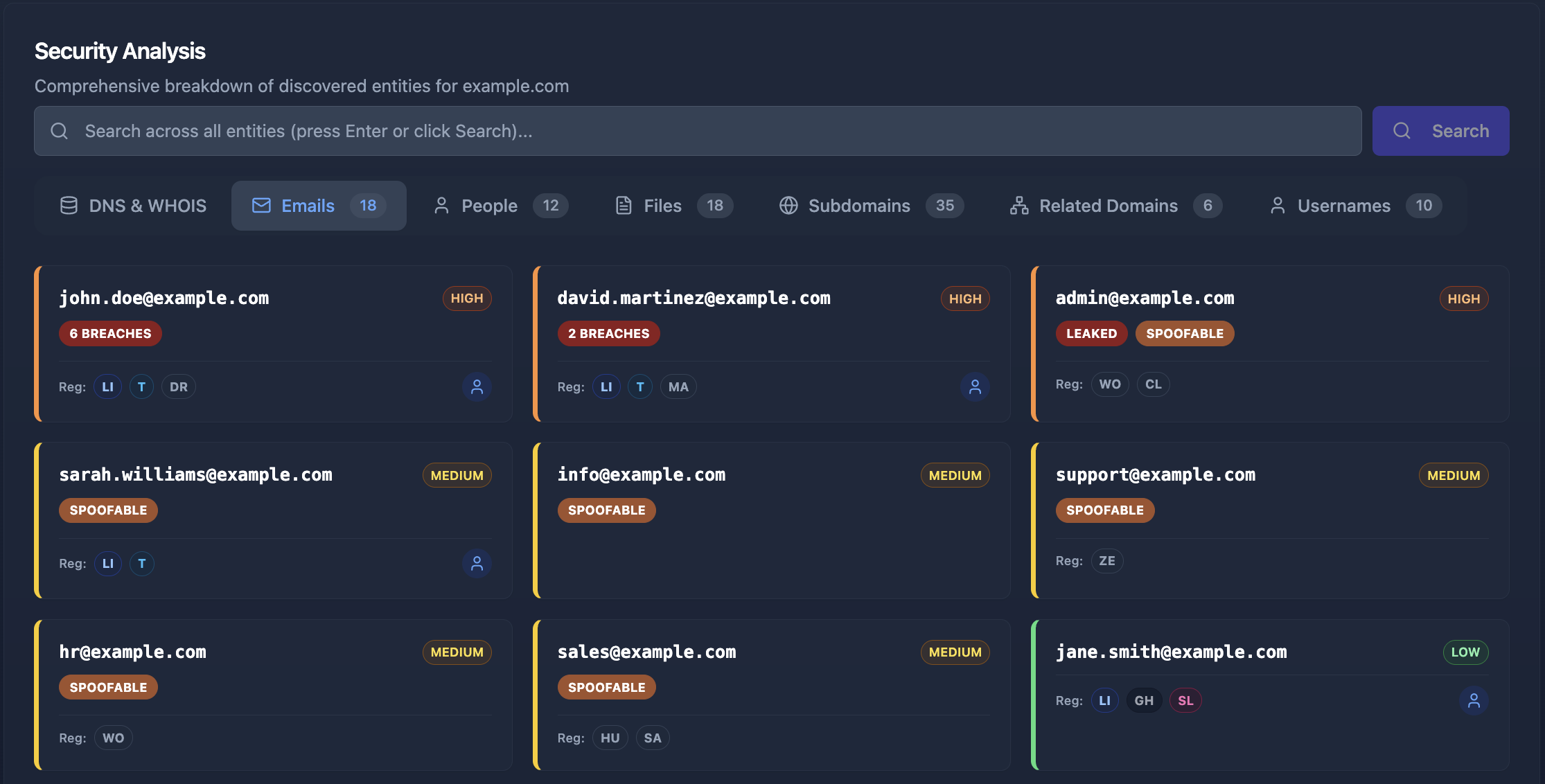
The assessment runs alongside all other reconnaissance — subdomain enumeration, email harvesting, breach checking, technology fingerprinting, and document metadata extraction. In minutes, you get a complete picture of your domain’s email security posture alongside every other aspect of your external attack surface.
From Detection to Remediation
When Cyborux flags a domain as spoofable, the fix is clear and well-defined: implement the SPF, DKIM, and DMARC configuration described in this guide. Unlike many security findings that require complex remediation, email authentication is entirely within your control — it is DNS records you own and can update today.
The real value is in the discovery. Most organizations assume their email authentication is configured correctly because someone set it up years ago. Cyborux reveals the current reality — whether the DMARC policy is not enabled, whether SPF records have drifted out of date, and whether subsidiary domains are completely unprotected.
Beyond the Basics: BIMI and MTA-STS
Once you have SPF, DKIM, and DMARC fully deployed with p=reject, two additional protocols can further strengthen your email security:
BIMI (Brand Indicators for Message Identification)
BIMI allows your brand logo to appear next to authenticated emails in supporting email clients (Gmail, Apple Mail, Yahoo). It requires a verified DMARC policy of p=quarantine or p=reject and a Verified Mark Certificate (VMC). While primarily a branding feature, BIMI gives recipients a visual confirmation that an email is genuinely from your organization — making spoofed emails that lack the logo more obviously suspicious.
MTA-STS (Mail Transfer Agent Strict Transport Security)
MTA-STS forces sending mail servers to use encrypted TLS connections when delivering email to your domain. Without MTA-STS, an attacker performing a man-in-the-middle attack on the network path between two mail servers could intercept or modify emails in transit — even if DKIM signatures would eventually fail. MTA-STS closes this gap by requiring encryption, preventing downgrade attacks on mail delivery.
Both protocols build on the foundation of SPF, DKIM, and DMARC. They are not substitutes — they are enhancements that only work once the core email authentication trio is properly configured.
Frequently Asked Questions
How do I prevent email spoofing?
Email spoofing prevention requires three DNS-based authentication protocols working together: SPF (defines which servers can send email for your domain), DKIM (cryptographically signs emails to prove they were not tampered with), and DMARC (enforces a policy when SPF or DKIM checks fail). Configure all three, with DMARC set to p=reject for maximum protection. Cyborux can check whether your domain has these protections configured correctly — enter your domain and see results in minutes.
What does “DMARC policy not enabled” mean?
When a security tool reports that the DMARC policy is not enabled, it means one of two things: either your domain has no DMARC DNS record at all, or it has a record with p=none — which generates reports but does not prevent spoofed emails from being delivered. To enable enforcement, set the policy to p=quarantine (sends failing emails to spam) or p=reject (blocks them entirely).
What does “DMARC quarantine/reject policy not enabled” mean?
This finding means your domain has a DMARC record, but the policy is set to p=none instead of p=quarantine or p=reject. With p=none, receiving mail servers are instructed to take no action on emails that fail SPF and DKIM checks — they deliver them normally. This provides zero protection against spoofing. To fix this, progress your DMARC policy from p=none to p=quarantine and eventually to p=reject, using the phased rollout approach described in this guide.
Can I set up DMARC without SPF and DKIM?
Technically, you can create a DMARC record without having SPF or DKIM configured, but it serves no purpose. DMARC evaluates the results of SPF and DKIM checks — if neither is set up, there are no results to evaluate. Always configure SPF and DKIM first, then layer DMARC on top as the enforcement policy.
How long does it take for SPF, DKIM, and DMARC to take effect?
DNS changes typically propagate within 24-48 hours, depending on your DNS provider’s TTL (Time to Live) settings. However, you may see results faster — many receiving mail servers begin checking new records within hours. Start your DMARC rollout with p=none to collect data without risking email delivery disruption.
Will DMARC reject block legitimate emails?
It can if your SPF record does not include all authorized sending services or if DKIM is not properly configured for all email sources. This is exactly why the phased rollout (none → quarantine → reject) is critical. The monitoring phase with p=none reveals all servers sending email as your domain, letting you update SPF and DKIM before enabling enforcement.
Do I need DMARC for subdomains too?
Yes. If you do not specify a subdomain policy (sp= tag) in your DMARC record, subdomains inherit the parent domain’s policy. However, attackers increasingly target subdomains specifically — spoofing mail.yourdomain.com or support.yourdomain.com. You can set sp=reject in your parent domain’s DMARC record to enforce rejection for all subdomains, or create individual DMARC records for critical subdomains with their own policies. This is especially important when you consider that exposed subdomains may reveal services that an attacker could use as pretexts in spoofed emails.
How does email spoofing relate to phishing?
Email spoofing is the technique — forging the sender address. Phishing is the attack — tricking the recipient into taking a harmful action. Spoofing makes phishing far more effective because the email appears to come from a trusted source. AI-driven phishing attacks are particularly dangerous when combined with a spoofable domain, because the attacker can forge emails from real employees while also personalizing the content using publicly available information about the target.
Is my domain currently vulnerable to spoofing?
You can check manually using dig commands to query your SPF, DKIM, and DMARC records. But a faster approach is to run your domain through Cyborux, which checks email authentication as part of a comprehensive domain reconnaissance. If your domain lacks proper authentication, Cyborux flags it as a high-severity finding and shows you exactly which protections are missing — alongside other exposures like breached employee emails, exposed technologies, and vulnerable subdomains.
Conclusion
Email spoofing is not an advanced attack. It is embarrassingly simple — a forged From: header on an email sent from any server on the internet. What makes it devastating is not the technique but the absence of defense. Without SPF, DKIM, and DMARC, your domain is an open invitation for impersonation.
The three protocols described in this guide are free, require no software, and can be fully implemented in a few days. SPF defines who can send. DKIM proves the email is genuine. DMARC enforces the policy and closes alignment gaps. Together, they make it functionally impossible for an attacker to send emails that appear to come from your domain.
Yet many organizations still operate with no DMARC enforcement — sometimes because they never configured it, sometimes because they deployed p=none during a monitoring phase and never progressed to enforcement, and sometimes because a misconfiguration years ago broke things and someone disabled protections as a quick fix.
Whatever the reason, the risk is immediate and measurable. Every day your domain operates without email authentication enforcement is a day an attacker can send emails as your CEO, your finance team, or your support department. The cost of a single successful BEC attack dwarfs the effort of configuring three DNS records.
Start today. Check your current SPF, DKIM, and DMARC configuration. Run your domain through Cyborux to see your email authentication posture alongside your complete external attack surface — spoofable emails, breached credentials, exposed subdomains, and more. No tools to install, no expertise required. Just the visibility you need to reduce your organization’s digital footprint before an attacker exploits it.
Your domain is either protected or it is not. There is no in-between.