Cybersecurity API for AI Agents: The Complete MCP Integration Guide
A security analyst opens Claude Desktop, types “Which emails on acme.com have appeared in data breaches?”, and gets a structured answer in seconds — complete with breach names, dates, and affected accounts. No browser tabs. No manual tool chaining. No CSV exports to correlate.
This is not a concept demo. It is what happens when you connect an AI assistant to a cybersecurity API through the Model Context Protocol (MCP) — the open standard that lets AI agents call external tools as naturally as they generate text.
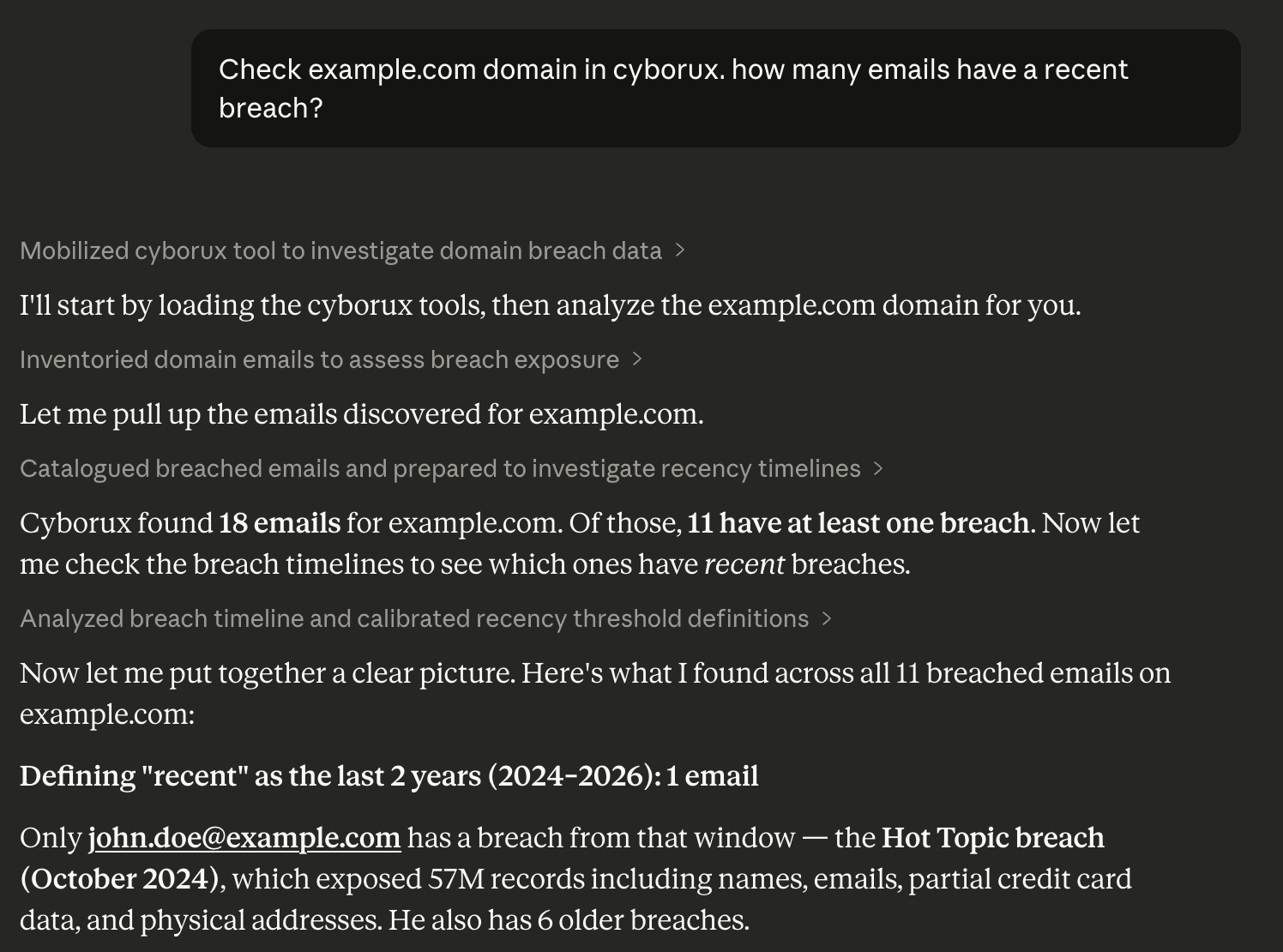
The shift from chatbot to autonomous agent is the most significant change in how security teams operate since the introduction of SIEM platforms. AI agents that can query domain intelligence, investigate email exposures, audit subdomains, and generate security reports — all through natural language — are not replacing analysts. They are removing the hours of manual data gathering that prevent analysts from doing actual analysis.
This guide covers everything you need to integrate a cybersecurity API with your AI workflows: what MCP is and why it matters for security, how to set up a working integration in minutes, what you can automate, and best practices for building AI-powered security operations that actually scale.
Why AI Agents Need Cybersecurity APIs
AI agents are moving beyond text generation. The most capable models — Claude, GPT, Gemini — now support tool use, meaning they can call external APIs, process structured data, and chain multiple operations together autonomously. For cybersecurity, this changes everything.
The Manual Reconnaissance Problem
Consider what a typical domain security assessment looks like today:
- Open a subdomain enumeration tool, run it, export results
- Switch to a breach database, check employee emails one by one
- Open another tool for technology fingerprinting
- Query WHOIS databases separately
- Run Google dorks manually in a browser
- Copy results into a spreadsheet to correlate findings
- Write up the report
Each step involves a different tool, a different interface, and manual data transfer between them. An analyst doing this across ten client domains spends more time operating tools than interpreting results.
What Changes with AI Agent Integration
When an AI agent has access to a cybersecurity API, the workflow collapses:
“Analyze the attack surface for acme.com. Show me breached emails, exposed subdomains with takeover risk, and any leaked infrastructure details.”
One prompt. The AI agent calls the right API endpoints in sequence, correlates the results, and presents a structured analysis. The analyst’s time shifts from data gathering to decision-making.
This is not about replacing security expertise — it is about removing the mechanical overhead that makes expertise expensive to apply at scale. The organizations monitoring fifty domains benefit the most, because the gap between “what we should be monitoring” and “what we have time to monitor” grows with every new asset.
The Model Context Protocol: How It Works
The Model Context Protocol (MCP) is an open standard developed by Anthropic that defines how AI applications communicate with external tools and data sources. Think of it as a universal adapter between AI models and APIs.
Without MCP, connecting an AI agent to a security tool requires custom code: building API wrappers, handling authentication, defining tool schemas, and managing error states. Each integration is bespoke.
With MCP, the integration is standardized:
MCP Architecture
──────────────────────────────────────────

┌─────────────────────────────────────┐
│  AI Assistant                       │
│  (Claude, Cursor, Claude Code)      │
└──────────────────┬──────────────────┘
                   │  Natural language
                   │  request
                   ▼
┌─────────────────────────────────────┐
│  MCP Client                         │
│  Translates intent → tool calls     │
└──────────────────┬──────────────────┘
                   │  Structured
                   │  tool call
                   ▼
┌─────────────────────────────────────┐
│  MCP Server                         │
│  @cyborux/mcp-server                │
│  22 cybersecurity tools             │
└──────────────────┬──────────────────┘
                   │  Authenticated
                   │  API request
                   ▼
┌─────────────────────────────────────┐
│  Cyborux API                        │
│  api.cyborux.com                    │
│  Domain intelligence + OSINT data   │
└─────────────────────────────────────┘

The AI decides WHICH tools to call,
in WHAT order, based on your question.
The MCP server acts as a bridge: it exposes a set of tools (with descriptions, input schemas, and output formats) that the AI model can discover and invoke. The model reads the tool descriptions, decides which ones to call based on the user’s question, and handles the results — all without the user writing any code.
This architecture is now supported by every major AI platform. Claude Desktop, Claude Code, Cursor, Windsurf, and dozens of other clients support MCP natively. Microsoft, OpenAI, and Google have all adopted the protocol. A single MCP server integration gives you access across all of them.
What the Cyborux MCP Server Can Do
Cyborux is an OSINT and external attack surface management platform that runs automated reconnaissance on domains — discovering subdomains, emails, people, files, infrastructure leaks, and credential exposures. The Cyborux MCP server exposes all of this intelligence through 22 tools that any MCP-compatible AI assistant can call directly.
Here is what becomes possible when your AI agent has access to Cyborux’s security data.
Domain Intelligence and Risk Assessment
Ask your AI assistant:
- “What is the risk score for example.com? What are the main concerns?”
- “Show me WHOIS details and DNS configuration for example.com”
- “Compare the security posture of example.com and example.org”
Behind the scenes, the Cyborux MCP server calls domain analysis endpoints that return risk scores, WHOIS data, DNS records, and security metrics. The AI interprets the structured response and presents it in context — explaining what matters and why.
Email and Breach Investigation
Email addresses are the most common entry point for credential attacks. With the Cyborux MCP integration, investigating email exposure becomes conversational:
- “Which emails on example.com have been in data breaches?”
- “Show me breach details for admin@example.com — when did the breach happen and what data was exposed?”
- “Are any C-level executives at example.com in breach databases?”
The AI agent calls list_emails to get all discovered emails with breach counts, then email_breaches for detailed timeline data on specific addresses. An investigation that takes an analyst thirty minutes of manual queries happens in a single prompt.
For more on why email breach monitoring matters, see our guide on identifying exposed employees and preventing phishing attacks.
Subdomain Auditing and Takeover Detection
Subdomain enumeration is one of the most critical reconnaissance tasks in external attack surface management. With the Cyborux MCP server:
- “List all active subdomains for example.com sorted by risk”
- “Are any subdomains vulnerable to takeover?”
- “What technologies are running on staging.example.com?”
The list_subdomains tool returns active subdomains with status information and takeover risk indicators. The subdomain_details tool provides technology fingerprinting and vulnerability data for specific subdomains. Your AI agent can chain these calls to build a complete subdomain audit from a single question.
Learn more about why subdomain discovery matters in our complete guide to subdomain enumeration.
People and Identity Intelligence
Understanding who is exposed — and how — is essential for targeted defense:
- “Who are the most exposed people at example.com?”
- “What data has been leaked about the CEO?”
- “Show me all usernames linked to employees of example.com”
The MCP server exposes list_people, person_details, and list_usernames tools that map organizational exposure at the individual level. Combined with breach data, this gives security teams a clear picture of which employees face the highest risk of credential-based attacks.
File Discovery and Metadata Analysis
Publicly accessible files often contain more than organizations intend to share. Document metadata can reveal internal infrastructure details, software versions, author names, and network paths:
- “What files have been found for example.com?”
- “Are there any documents leaking internal infrastructure details?”
The list_files and list_infrastructure tools surface discovered documents and the metadata extracted from them — including internal IP addresses, server names, and printer paths that should never be publicly visible.
Report Generation and Deep Scans
For formal deliverables and ongoing monitoring:
- “Generate a PDF security report for example.com”
- “Schedule a deep vulnerability scan for blog.example.com”
- “Show me the results of the last deep scan”
The generate_domain_report tool produces formatted PDF reports suitable for client deliverables or internal review. The schedule_deep_scan and list_deep_scans tools manage vulnerability scanning workflows — all through natural language.
Setting Up Your First Cybersecurity MCP Integration
Getting from zero to a working cybersecurity MCP integration takes less than five minutes. Here is the complete setup process.
Prerequisites
You need two things:
- Node.js installed (LTS version recommended) — the MCP server runs as an npm package
- An AI client that supports MCP — Claude Desktop, Claude Code, or Cursor
Step 1: Get Your API Key
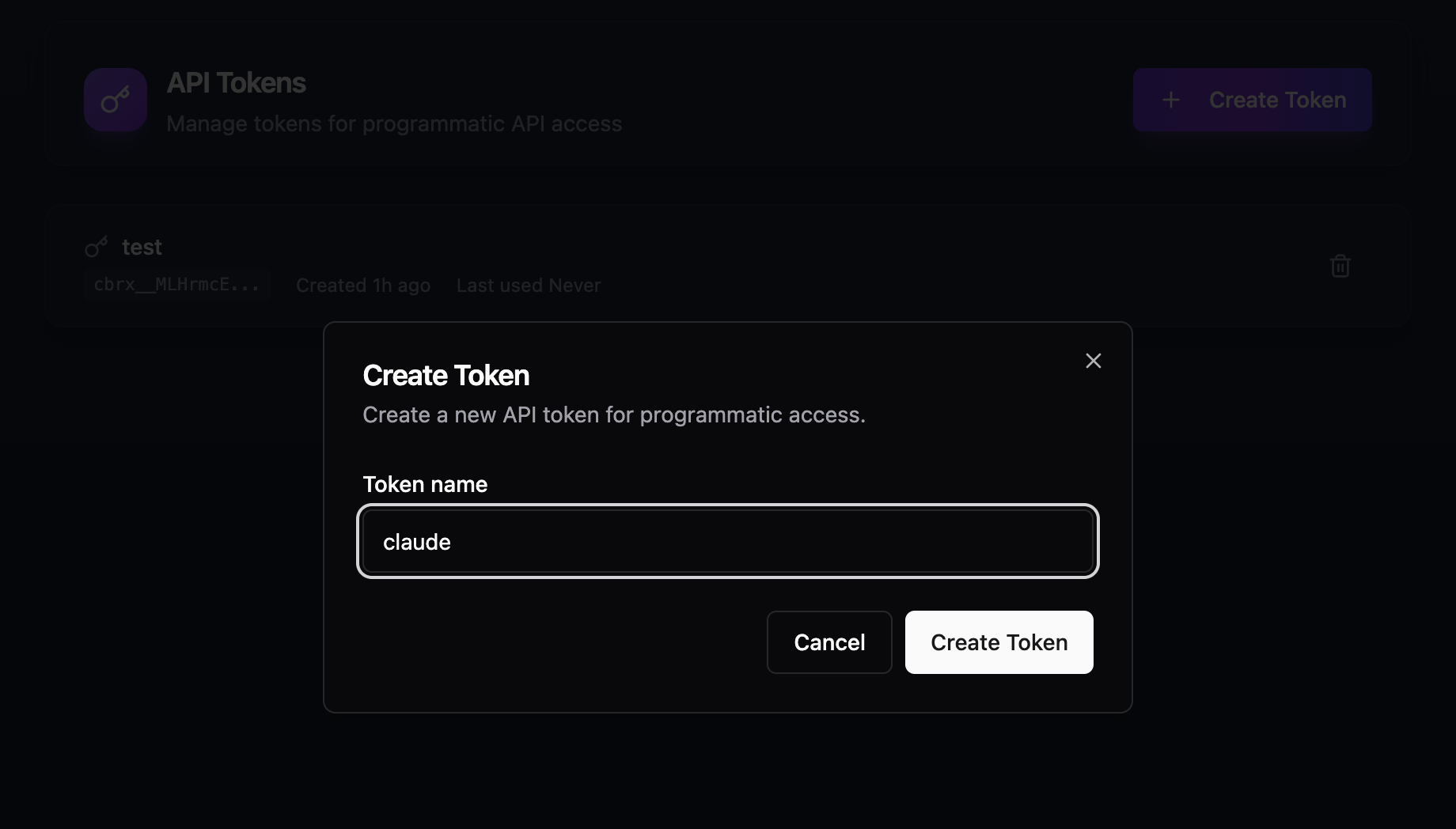
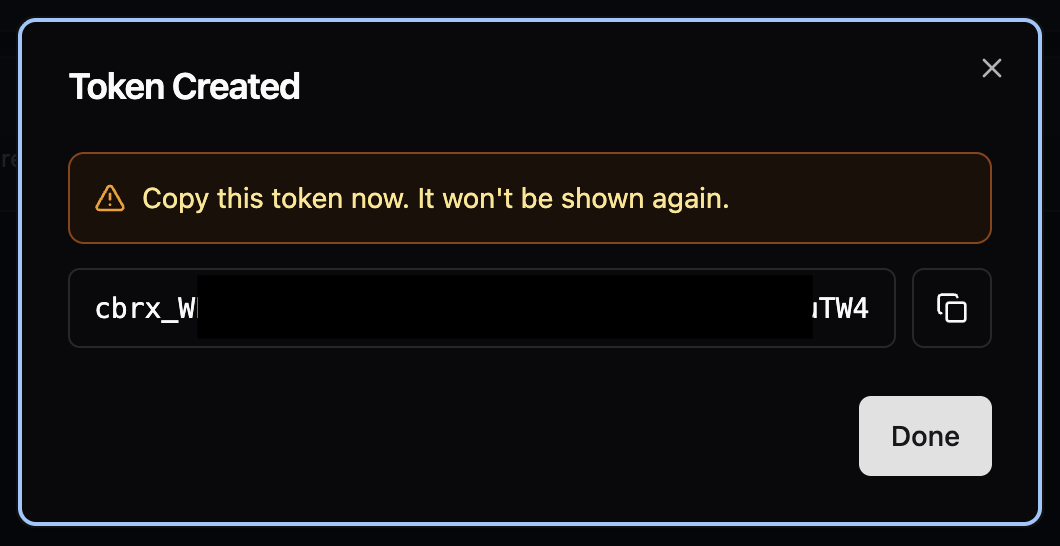
Sign in to Cyborux and navigate to API Tokens. Click Create Token, give it a name, and copy the generated key immediately — it starts with cbrx_ and is only shown once.
Step 2: Configure Your AI Client
The configuration depends on which client you use. The MCP server package is @cyborux/mcp-server — it installs automatically via npx.
Claude Desktop:
Open Settings → Developer → Edit Config. This opens the folder containing claude_desktop_config.json. Add the Cyborux MCP server:
{
  "mcpServers": {
    "cyborux": {
      "command": "npx",
      "args": ["-y", "@cyborux/mcp-server"],
      "env": {
        "CYBORUX_API_KEY": "cbrx_your_token_here"
      }
    }
  }
}
Claude Code:
A single command handles everything:
claude mcp add cyborux \
  -e CYBORUX_API_KEY=cbrx_your_token_here \
  -- npx -y @cyborux/mcp-server
Cursor:
Open Settings → MCP Servers and add the same JSON configuration used for Claude Desktop.
Step 3: Restart and Verify
Restart your AI client. You should see the Cyborux connector enabled in your connectors list, ready to use:
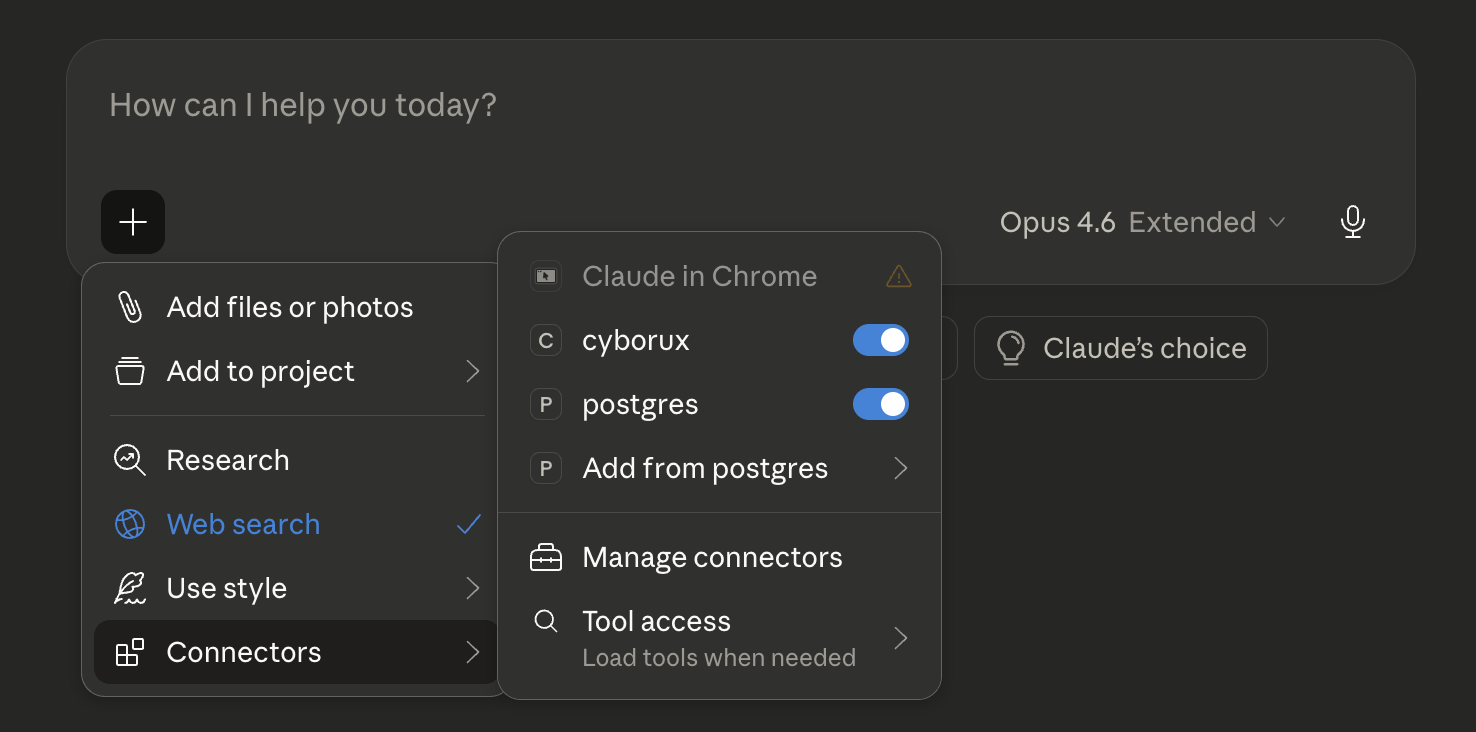
Test with a simple query:
“List my domains on Cyborux”
The AI should call the list_domains tool and return your monitored domains. If this works, you are ready to query any domain in your account.
The 22 Tools: A Complete Reference
The Cyborux MCP server exposes 22 tools organized into six categories. Each tool maps to a specific API endpoint, and the AI model selects the right combination based on your question.
The AI model reads these tool descriptions when your conversation starts and uses them to decide which tools to invoke. You never need to know the tool names — just ask your question in natural language.
Real-World Workflows: From Question to Intelligence
The real power of a cybersecurity MCP integration is not in individual tool calls — it is in how the AI chains them together to answer complex questions. Here are workflows that demonstrate what becomes possible.
Workflow 1: Client Onboarding Assessment
A security consultant takes on a new client and needs a baseline assessment:
“Analyze newclient.com. Once the analysis is complete, give me a summary of the risk score, all breached emails, any subdomains at risk of takeover, and what technologies are exposed.”
The AI agent:
- Calls
analyze_domainto trigger comprehensive OSINT reconnaissance - Monitors progress via
domain_summaryuntil analysis completes - Calls
list_emailswith breach filter to find exposed credentials - Calls
list_subdomainsto identify takeover risks - Calls
subdomain_detailson flagged subdomains for technology data - Synthesizes everything into a structured assessment
What would take an analyst an hour of manual tool operation happens in a single conversation.
Workflow 2: Executive Exposure Briefing
A CISO needs to understand how exposed the leadership team is:
“Show me the most exposed people at corp.com. For each executive, tell me what breaches their emails appear in and what social media usernames are linked to them.”
The AI chains list_people → person_details → email_breaches → list_usernames to build individual exposure profiles. The output is a structured briefing ready for board-level reporting.
Workflow 3: Continuous Monitoring Review
A managed security provider reviews their portfolio weekly:
“List all my monitored domains. For any with a risk score above 70, show me what changed since the last check — new breached emails, new subdomains, or new files discovered.”
The AI calls list_domains, filters by risk score, and drills into each high-risk domain with targeted queries. A portfolio review that takes an afternoon becomes a ten-minute conversation.
Workflow 4: Incident Response Support
During an incident, speed matters:
“We suspect a phishing campaign targeting corp.com employees. Show me all emails that have been in breaches, the platforms they are registered on, and any leaked infrastructure details that could help attackers craft convincing lures.”
The AI pulls breach data, username mappings, and infrastructure leaks in parallel, presenting the analyst with exactly the intelligence needed to scope the incident and predict the attacker’s next moves.
MCP vs. Direct API vs. Traditional Tools
Understanding where MCP fits relative to other approaches helps you choose the right tool for each use case.
MCP is not a replacement for direct API integration — it is a different access pattern. Use MCP for interactive analysis, investigation, and reporting. Use the REST API for automated pipelines, scheduled monitoring, and integration with existing security tools. Use both when your workflow demands it.
For teams building custom automation on top of the API, see the full Cyborux API reference.
Connect your AI agent to real cybersecurity intelligence
Set up the Cyborux MCP server in under 3 minutes. 22 tools for domain reconnaissance, breach monitoring, subdomain auditing, and more — all accessible through natural language.
Get Your API KeyBuilding AI-Powered Security Workflows: Best Practices
Connecting an AI agent to cybersecurity data is straightforward. Getting consistent, reliable results requires attention to how you structure your queries and workflows.
Write Specific Prompts
Vague prompts produce vague results. Compare:
- Weak: “Tell me about example.com”
- Strong: “Show me all subdomains of example.com that are active, sorted by risk. For any with known vulnerabilities, list the specific technologies detected.”
The more specific your question, the more precisely the AI selects and chains tools. Include the domain name, the entity types you care about, and any filters or sorting criteria.
Chain Questions Iteratively
Complex investigations work best as conversations, not single prompts:
- Start broad: “Give me an overview of example.com’s security posture”
- Drill into findings: “Tell me more about those 5 breached emails”
- Investigate specifics: “What other accounts are linked to john@example.com?”
- Take action: “Generate a PDF report covering everything we found”
Each question builds on the context established by previous answers. The AI maintains conversation state, so you do not need to repeat domain names or re-establish context.
Use Reports for Stakeholder Communication
Raw tool output is useful for analysts but overwhelming for executives. Use the generate_domain_report tool to create formatted PDF deliverables:
“Generate a comprehensive security report for example.com that I can share with the client’s CISO”
This produces a structured document covering all entity types — suitable for board presentations, client deliverables, or compliance documentation.
Combine MCP with the Dashboard
The MCP integration complements the Cyborux web dashboard — it does not replace it. Use the dashboard for:
- Visual exploration — browsing subdomains, emails, and people with the full UI
- Continuous monitoring — setting up domains for ongoing surveillance
- Team collaboration — sharing access and reports across the organization
Use MCP for:
- Fast ad-hoc queries — asking specific questions without navigating the UI
- Investigation workflows — chaining multiple queries in conversation
- Report generation — producing deliverables through natural language
- Cross-domain analysis — comparing findings across multiple domains quickly
Security Considerations for MCP Deployments
When deploying any MCP server, including cybersecurity integrations, follow these security practices:
- Treat API tokens as secrets — store them securely, rotate periodically, and never commit them to version control
- Use least-privilege tokens — create dedicated API tokens for MCP use with appropriate permission scope
- Review tool calls — most MCP clients show which tools are being called before execution, giving you oversight of what data is being accessed
- Understand data flow — prompts and tool results pass through the AI model’s context window, so be aware of what data you are querying in shared or untrusted environments
For a broader perspective on securing your organization’s external exposure, see our guide on reducing your digital footprint.
The Bigger Picture: AI Agents and the Future of Security Operations
The cybersecurity MCP server pattern is part of a larger shift in how security operations work. Here is what is changing and why it matters.
From Tool Operators to Intelligence Analysts
Security teams have historically spent the majority of their time operating tools — running scans, exporting data, correlating spreadsheets, formatting reports. AI agents absorb this operational overhead, freeing analysts to focus on interpretation, decision-making, and response.
This does not mean fewer security jobs. It means each analyst can cover more ground, monitor more assets, and respond faster. The organizations that adopt AI-augmented workflows will not need fewer people — they will get more value from the people they have.
From Point-in-Time to Continuous
Manual assessments are snapshots. By the time you finish a domain reconnaissance report, the attack surface has already changed — new subdomains deployed, new employees onboarded, new breaches disclosed. AI agents connected to continuously updated intelligence sources turn point-in-time assessments into ongoing monitoring.
Ask the same question next week and get updated answers. No new scans to run, no tools to reconfigure.
From Siloed Tools to Unified Intelligence
The average security team uses dozens of tools, each with its own interface, data format, and learning curve. MCP collapses these silos by providing a single conversational interface to structured data that spans all entity types — domains, subdomains, emails, people, files, infrastructure, and vulnerabilities.
The analyst who can query across all these data types in natural language works faster than the analyst who needs to switch between six different dashboards.
Who Benefits Most from Cybersecurity MCP Integration
Security Consultants and Penetration Testers
Speed is revenue. The faster you can scope a client’s exposure, the more engagements you can handle. MCP turns the reconnaissance phase of a penetration test from a half-day exercise into a ten-minute conversation. Ask your AI agent to analyze the domain, pull breach data, identify takeover-vulnerable subdomains, and map exposed employees — all before your first call with the client.
Pair this with the OSINT techniques and tools you already know, and the AI handles the mechanical execution while you focus on analysis and exploitation.
Managed Security Service Providers (MSSPs)
Managing dozens of client domains requires scalable monitoring. MCP lets you review your entire portfolio through conversation: “Which of my monitored domains had new breaches this week?” — and drill into specific clients as needed. Reports that took hours to compile can be generated with a single prompt.
IT Managers and Small Security Teams
Not every organization has a dedicated security analyst. IT managers who need visibility into their external attack surface can use MCP to query domain intelligence without learning specialized tools. The AI acts as a knowledgeable assistant that translates security data into actionable recommendations.
Developers Building Security Automation
For teams that want to build security checks into their development workflow, the MCP server runs in any environment that supports Node.js. Integrate it with Claude Code or Cursor to check subdomain security, verify TLS configurations, and audit email authentication records — all from within your development environment.
Frequently Asked Questions
What is MCP in cybersecurity?
MCP (Model Context Protocol) is an open standard that allows AI assistants to securely call external Developing tools and APIs. In cybersecurity, MCP servers connect AI agents to security platforms — enabling natural language queries against domain intelligence, breach databases, subdomain inventories, and other OSINT data sources. Instead of manually operating security tools, analysts ask questions and the AI handles the tool execution.
Is the Cyborux MCP server free?
The MCP server package (@cyborux/mcp-server) is free to install. However, using the tools requires an active Cyborux subscription — you can sign up freely, but domain analysis and data access require a monthly plan or a one-shot analysis credit. Note that API token creation is only available on monthly plans (Protect, Vigilant, or Enterprise) — one-shot credits allow you to analyze domains through the web interface, but generating the API token needed for MCP requires an active monthly subscription. The tools available and data limits depend on your subscription tier. Sign in to Cyborux to explore plans and create an API token.
Which AI clients support MCP?
All major AI clients support MCP: Claude Desktop, Claude Code, Cursor, Windsurf, and many others. The protocol has been adopted by Anthropic, OpenAI, Google, and Microsoft, making it the de facto standard for AI-tool integration. The Cyborux MCP server works with any client that implements the MCP specification.
Can I use MCP and the REST API together?
Yes — and this is the recommended approach for teams that need both interactive analysis and automated pipelines. Use MCP through your AI assistant for ad-hoc investigations, reporting, and conversational analysis. Use the REST API directly for automated monitoring scripts, CI/CD integrations, and custom dashboards.
How does MCP compare to building custom API integrations?
MCP eliminates the need to write wrapper code, handle authentication flows, define tool schemas, and manage error states for each AI integration. A single MCP server configuration gives your AI agent access to 22 cybersecurity tools immediately. Building the same capability through custom API integration would require hundreds of lines of code per AI client. MCP is the standard — custom integrations are the workaround.
Is it safe to give an AI agent access to security data?
Most of the data Cyborux surfaces originates from public sources — subdomains, WHOIS records, email addresses, breach database entries, and indexed files are all discoverable through OSINT. What Cyborux adds is the aggregation, correlation, and enrichment layer on top: pulling from a growing number of curated data sources, cross-referencing findings across entity types, and surfacing insights that would take hours of manual tool-chaining to produce. You are not exposing private data to the AI — you are giving it access to structured intelligence that is already publicly accessible but far too time-consuming to assemble manually.
That said, for organizations with stricter data governance requirements — particularly enterprises handling sensitive client assessments — two options provide additional control. First, you can run the MCP server with a local LLM instead of a cloud-hosted model, keeping all queries and results entirely on-premise. Second, enterprise AI platforms like Claude Enterprise offer zero-data-retention agreements, meaning your queries and tool results are never stored or used for model training.
MCP clients also show tool calls before executing them, giving you full visibility into what data is being accessed. API tokens can be rotated, and you can create dedicated tokens with scoped permissions for MCP use.
What can I ask the AI once MCP is set up?
Anything related to the domains in your Cyborux account. Common queries include: checking email breach exposure, auditing subdomain security, reviewing risk scores, investigating specific people or employees, finding exposed documents, generating PDF reports, and scheduling vulnerability scans. The AI selects from 22 tools to answer your question — you never need to know the tool names or API endpoints.
Conclusion
The gap between what security teams need to monitor and what they have capacity to monitor grows every quarter. New employees, new subdomains, new SaaS tools, new breaches — the external attack surface expands faster than manual processes can track.
Cybersecurity APIs connected through MCP close that gap. Not by replacing analysts, but by removing the hours of tool operation, data gathering, and manual correlation that keep analysts from doing what they do best — interpreting data and making decisions.
The setup takes three minutes. The integration gives your AI agent 22 cybersecurity tools. And the questions you can ask are limited only by the intelligence available in your account.
Get your API key, configure your MCP client, and start asking questions. The domains you are responsible for are already exposing data — the only question is whether you are going to find it before someone else does.